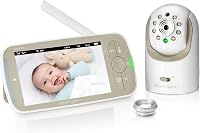
Which Add-On Camera Fits the Infant Optics DXR-8 Pro?
The Infant Optics DXR-8 PRO Add-on Camera fits the 5-inch DXR-8 PRO monitor only. It does not work with the original 3.5-inch DXR-8, so check your parent monitor before buying.
On this page (7 sections)
- Which Infant Optics DXR-8 add-on camera is compatible?
- How can you tell which DXR-8 monitor you own?
- What does the DXR-8 PRO add-on camera do?
- Is an add-on camera better than another full DXR-8 PRO kit?
- How should you plan camera placement?
- What should you check before pairing?
- Which camera should you choose?
The Infant Optics DXR-8 PRO Add-on Camera fits the 5-inch DXR-8 PRO monitor, not the original 3.5-inch DXR-8. That single check decides whether an extra camera will work in your home.
This matters because the two DXR-8 generations look related on a shelf and share much of the same naming. They do not share camera compatibility, so a camera bought for one generation will not solve a problem in the other.
If you own a DXR-8 PRO parent unit, the add-on camera gives you a way to watch a second room from the monitor you already carry. It suits a nursery plus a play space, or a baby's room plus a toddler's room, without needing a second parent monitor.
If you own the original 3.5-inch DXR-8, this add-on is not the route to another camera. You would need equipment made for that original system instead, and mixing the two generations will not work.
The safest habit is to check the label on your parent monitor before you order anything. That label tells you which generation you have, and it takes less time than returning a camera that cannot pair.
If you are comparing the two monitors first, our Infant Optics DXR-8 vs Pro guide explains the main differences. That comparison helps you understand why the camera decision starts with the monitor you already own.
In short, the PRO add-on camera is for PRO owners who want more coverage from one monitor. For everyone else, the match depends on the generation printed on the unit in your hand.
Which Infant Optics DXR-8 add-on camera is compatible?
The compatible choice is the Infant Optics DXR-8 PRO Add-on Camera. It works with the DXR-8 PRO monitor and does not work with the original DXR-8 3.5-inch model.
The product names can look similar, but the generation matters more than the shared DXR-8 wording. Both names point to Infant Optics monitors, yet they describe different systems for pairing.
The original DXR-8 uses a 3.5-inch monitor unit, while the DXR-8 PRO uses a 5-inch monitor unit. That screen size difference is the clearest outward sign of the generation split.
The add-on camera in this guide belongs to the larger 5-inch system only. It takes the same type of camera as the DXR-8 PRO kit and pairs with that parent unit.
Do not rely on the DXR-8 name alone when you shop. Look for the word PRO and the 5-inch monitor, then confirm the label on your own unit before you choose.
How can you tell which DXR-8 monitor you own?
Check the label on the parent monitor unit to confirm whether it is the original DXR-8 or the DXR-8 PRO. Do not choose by appearance alone, because both systems use the DXR-8 name and support camera viewing.
The label is the most reliable clue. It removes guesswork when boxes, listings and camera names use similar words for different generations.
The original model is the Infant Optics DXR-8 480p Video Baby Monitor. It uses a non-WiFi FHSS connection, interchangeable lenses, remote pan, tilt and zoom, night vision, an LED sound bar and two-way talk.
That system suits owners who already have the 3.5-inch monitor and want to stay within its generation. Its lens options include a zoom lens for a closer look and a wide-angle lens sold separately for a broader view.
The newer model is the Infant Optics DXR-8 PRO. Its title identifies a 5-inch HD video monitor with one camera, no WiFi, second-generation FHSS, interchangeable lenses and active noise reduction.
The PRO monitor is the one to pair with the PRO add-on camera. Its direct private signal connects camera and monitor without passing through a router or the internet.
Screen size can also guide the check. A 3.5-inch parent unit points to the original DXR-8, while a 5-inch parent unit points to the DXR-8 PRO.
The PRO also brings active noise reduction. That feature filters constant background sounds such as fans, air purifiers, heaters and air conditioners, so the audio focuses more on your baby.
The original DXR-8 offers a dedicated monitor unit, so you do not need to open a phone app to view your baby. When you compare the two, think about which monitor is already in your home.
If you already own the PRO parent unit but need a replacement screen, see our guide to choosing an Infant Optics DXR-8 Pro monitor only. A monitor replacement and an add-on camera solve different problems.
A replacement monitor restores the parent unit you use every day. An add-on camera expands coverage to another room once that parent unit is working.
If your issue is a fading battery, treat that as a separate fix. The PRO has a user-replaceable battery, so a weak battery does not necessarily mean you need a new camera.
Keep the decisions apart when you shop. First confirm the generation, then decide whether you need a monitor, a battery or an extra camera.
What does the DXR-8 PRO add-on camera do?
The add-on camera provides 720p HD video, night vision, remote pan, tilt and zoom, a room thermometer and interchangeable lens support. It is the same type of camera supplied with the DXR-8 PRO system.
The 720p video gives a clearer view than the 480p original. Night vision lets you check the room without turning on nursery lights.
Remote pan, tilt and zoom mean you can adjust the view from the parent monitor. That helps when a baby moves across a crib or when you want a closer look without walking back into the room.
The room thermometer adds a simple comfort check. You can glance at the reading during the night and decide whether the room feels too warm or too cool for sleep.
Interchangeable lens support lets you adapt the camera to the space. The standard view suits many single-room setups, and lens changes can help if the first view feels too narrow or too distant.
The camera pairs with the DXR-8 PRO monitor without relying on WiFi, an app or cloud access. The monitor can connect with up to 4 cameras total, which lets you watch several rooms from one parent unit.
That direct connection is a major reason many families choose this system. You are not managing accounts, subscriptions or app updates for basic viewing.
For multi-room use, press the Camera button to switch feeds, or use Scan Mode to rotate between rooms in turn. This keeps the routine quick when you need to check each room.
To add it, open Menu, choose Camera Control, select Add Camera, then hold the Pair button on the new camera until its light flashes. The pairing process takes about 1 minute.
The camera includes a wall mount and power adapter. The wall mount helps you fix the position at a height that keeps the view clear of furniture and clutter.
Its zoom lens and wide-angle lens are sold separately. Choose those accessories only if the standard viewing angle does not suit your room.
For a small nursery, the standard view often does the job. For a larger play space, a wide-angle lens may help you see more of the room from one fixed point.
For a camera placed farther from the sleep area, a zoom lens may help. It gives a closer view while the camera stays in a safe, out-of-reach position.
Keep the lens clear of dust and avoid blocking the camera with soft items, so night vision stays useful. The trade-off is that one monitor shows one feed at a time unless you switch or scan.
Is an add-on camera better than another full DXR-8 PRO kit?
An add-on camera is the better fit when one caregiver needs to watch several rooms from one DXR-8 PRO monitor. It expands an existing system without adding another parent unit.
One parent monitor can stay in the main living area while you switch between the nursery and another room as needed. That suits the way many families move through the day.
A second full DXR-8 PRO kit makes more sense when two caregivers need to watch independently at the same time. Two kits give each person a separate parent monitor and camera pair.
Consider who needs the view and when. If one adult is in charge overnight, an add-on camera is usually the cleaner choice.
If two adults in different rooms both need live views, a second kit may be worth the extra cost.
The complete kit includes one camera, a 5-inch monitor with a rechargeable lithium-ion battery, an optical zoom lens, a charging cable, a power adapter, a camera unit with an aluminum lens hood, mounting screws and an anchor, and an instruction manual.
That list shows why a full kit costs more and covers more. It gives you a second screen and a second camera, which is useful for independent watching but unnecessary for simple multi-room coverage.
The add-on camera is narrower by design. It does not include a parent monitor, so it cannot stand alone for a family starting from zero.
For an existing PRO owner, that narrow scope is a benefit. You spend only on the extra coverage you need and keep one monitor to charge and carry.
The DXR-8 PRO also has a user-replaceable battery. That design matters over time, because a worn battery does not have to force you to replace the whole monitor.
In daily use, a replaceable battery supports long-term ownership. You can restore portability and runtime in seconds instead of discarding a monitor that still works.
If your monitor battery is the problem rather than your camera count, read our Infant Optics DXR-8 Pro battery replacement guide before buying another camera. Replacing a battery and adding a room are different fixes.
Ask one simple question before you order. If you need another room on the same monitor, choose the add-on camera.
If you need another monitor in another hands, choose a full kit.
That question keeps the purchase tied to your routine. It also stops a second kit from becoming an expensive answer to a problem you do not have.
How should you plan camera placement?
Place each camera where its supported view covers the sleep or play area without constant repositioning. Use remote pan, tilt and zoom from the parent monitor to adjust the view after installation.
Start with the room layout. A crib or bassinet should sit inside the normal view, with enough margin that a moving baby does not leave the frame too quickly.
Think about height and angle before you mount anything. A position that looks across the sleep area gives more useful detail than a corner view that only catches the edge of the bed.
Remote pan and tilt help after mounting, but they work best as fine adjustments. They are not a substitute for a poor starting position, so test the wide view first.
The DXR-8 PRO add-on camera supports interchangeable lenses, with zoom and wide-angle lenses sold separately. A lens can widen or tighten the view, but it cannot fix a camera that faces the wrong wall.
A standard view may suit a single crib or bassinet. It keeps the focus on the sleep space and avoids showing more of the room than you need.
A wide-angle lens can make more sense when you need to see more of a room. That choice suits a play area or a room where the baby moves between a few spots.
A zoom lens helps with a closer view from farther away. It suits a camera placed high or across the room where you want more detail on the sleep area.
Consider the trade-off with each lens. Wide views show more context, while zoom views show more detail, so choose based on distance and room size.
For the PRO system, the included optical zoom lens supports close detail from across the nursery. The wide-angle lens, sold separately, is the option to add for a fuller room view.
Night use should guide your placement too. Keep the view clear of curtains, bedding and other items that could block the lens or affect night vision.
Test the view at the spot where you usually carry the parent monitor. That check shows whether the framing works from the kitchen, a hallway or a bedside table.
If you want two feeds visible at once, read our guide to Infant Optics DXR-8 Pro split screen. You can also compare other options in our best two camera split screen baby monitor guide.
Those guides help if simultaneous viewing matters to your routine. If you mainly check one room at a time, switching feeds may be simpler.
For most nurseries, a stable standard view is enough. Add a second camera for a second room, then use pan, tilt and zoom to refine what you see.
What should you check before pairing?
Confirm the parent monitor generation first, then choose a practical location near power. The DXR-8 PRO add-on camera is for indoor use, and the camera needs its power adapter connected during normal operation.
Power placement is worth planning before pairing. A socket near the nursery or play space keeps the cord short and reduces the chance of the camera being pulled or knocked.
Choose a spot that keeps the camera out of reach but close enough for a clear view. Shelves, dressers and wall mounts can work if the view covers the sleep or play area.
Keep the camera view clear of objects that block the lens or night vision. Soft toys, blankets and storage boxes should stay outside the frame you rely on at night.
Test the viewing angle from the place where you usually carry the parent monitor. That step shows you whether the camera needs to move left, right, up or down before you finish setup.
Use remote pan, tilt or zoom to refine the frame after pairing. Small adjustments can centre a crib or show more of a play space without moving the mount.
Check the room thermometer reading once the camera is running. It gives a quick sense of whether the space feels comfortable during sleep.
The DXR-8 PRO uses active noise reduction to filter constant sounds such as fans, air purifiers, heaters and air conditioners. That helps when a nursery has background noise that would otherwise crowd out the baby's sounds.
If you hear unexpected sounds from the parent unit, our guide to the blue LED lights on an Infant Optics DXR-8 Pro explains the volume indicator. The lights can help you judge sound level without relying on the screen alone.
Pairing itself follows a short sequence. On the monitor, open Menu, choose Camera Control and select Add Camera, then hold the Pair button on the new camera until its light flashes.
Do that pairing step in the room where the camera will live. It makes it easier to confirm the feed, the angle and the sound before you leave the nursery.
For broader buying advice, start with our best baby monitor system guide. It covers the larger choice between dedicated monitor systems and other baby monitor setups.
Use that broader guide if you are still deciding between systems. Use this compatibility check if you already own a DXR-8 PRO and want to add a room.
Which camera should you choose?
Choose the Infant Optics DXR-8 PRO Add-on Camera if your parent unit is the 5-inch DXR-8 PRO and you want another room on the same monitor. That choice keeps your existing system and extends its coverage.
It suits families who already trust the PRO monitor for daily use. The add-on camera brings the same kind of 720p HD view, night vision, remote pan, tilt and zoom, room thermometer and interchangeable lens support to the next room.
Choose the original DXR-8 system only when you already own the 3.5-inch model and need equipment for that generation. The PRO add-on will not work with that parent unit, so the generation check still comes first.
If you need a complete setup, choose the DXR-8 PRO kit. That kit gives you a 5-inch monitor and one camera together, which is the right start for a first nursery or a new home.
If you need another camera for an existing PRO system, choose the PRO add-on camera. It assumes the parent monitor is already in place and working.
Think about lenses after you choose the camera. The standard view may cover a crib well, while a wide-angle or zoom lens can help in a larger or more distant room.
Think about who needs to watch as well. One caregiver switching between rooms fits the add-on approach, while two independent watchers may need a second kit.
That compatibility check is the rule that prevents the most expensive mistake. Confirm the PRO label, then buy the camera made for it.
Frequently asked questions
Does the Infant Optics DXR-8 PRO add-on camera work with the original DXR-8?
No. The Infant Optics DXR-8 PRO Add-on Camera is compatible with the 5-inch DXR-8 PRO monitor only.
It does not work with the original 3.5-inch DXR-8.
Check the label on your parent monitor before ordering, because the two monitor generations use different camera compatibility.
How many cameras can connect to the DXR-8 PRO?
The DXR-8 PRO can connect with up to 4 cameras total. You can press the Camera button to switch between feeds or use Scan Mode to rotate between rooms.
The add-on camera is useful when one parent monitor needs to cover more than one nursery or play space.
Does the DXR-8 PRO add-on camera include a monitor?
No. The Infant Optics DXR-8 PRO Add-on Camera is an additional camera unit for an existing DXR-8 PRO system.
It does not replace the parent monitor.
Choose a full DXR-8 PRO kit if you need a complete monitor and camera setup instead of an extra camera.
Can I use a wide-angle lens with the DXR-8 PRO add-on camera?
Yes. The add-on camera supports interchangeable lenses, while the zoom lens and wide-angle lens are sold separately.
Its camera functions include remote pan, tilt and zoom, night vision, a room thermometer and 720p video.
Choose the lens based on the room view you need.