Infant Optics DXR-8 Pro Baby Monitor Review: Worth It? (November 2026)
The Infant Optics DXR-8 Pro is a strong choice for private, non-Wi-Fi nursery monitoring with 720p video, ANR, remote camera control and interchangeable lenses. Choose the add-on camera for another room or the genuine battery for a worn monitor battery.
On this page (10 sections)
- What makes the Infant Optics DXR-8 Pro different?
- How clear is the DXR-8 Pro video?
- Does Active Noise Reduction help in a nursery?
- What are the lens options?
- Can you add another camera to the DXR-8 Pro?
- Is the DXR-8 Pro good for multiple rooms?
- How does it compare with Wi-Fi baby monitors?
- What happens when the monitor battery wears out?
- How should you set up the DXR-8 Pro?
- Infant Optics DXR-8 Pro review verdict
The Infant Optics DXR-8 Pro is a strong choice for private, non-Wi-Fi nursery monitoring. It combines 720p video, Active Noise Reduction, remote pan, tilt and zoom, night vision, and interchangeable lenses in a dedicated monitor system.
This setup suits families who want a clear picture on a parent monitor without opening an app on a phone. The camera connects directly to the monitor, so nightly viewing stays in one place beside the bed or in another room.
Its main trade-off is the lack of Wi-Fi and app access. That makes the system less useful for checking the nursery from outside the home, but it avoids router, cloud and account dependence.
Parents who travel, work late or rely on trusted caregivers at home may miss phone viewing. A Wi-Fi model would fit those routines better, while this system fits a single home base.
We compared the listed features, included parts and compatibility details for the DXR-8 Pro system. That includes the private FHSS connection, the included lenses, the add-on camera options and the replaceable battery.
It also includes limits such as indoor use and the separate wide-angle lens. The result is a monitor built around direct local viewing rather than remote access.
Set-up stays focused on placing the camera and charging the monitor for night use. There is no account to create and no software update to wait for before the first night.
For everyday care, keep the camera lens clean and check the mounting after any move. A steady view matters more than frequent changes once the room is set.
The system also suits a nursery where steady background noise is part of the room. Active Noise Reduction is meant to filter fans, purifiers, heaters and air conditioners so baby sounds stand out more clearly.
That feature does not remove the need to place the camera well. A clear view of the sleep space still comes first, with sound as support rather than a substitute for visibility.
Overall, the DXR-8 Pro makes sense when privacy and a dedicated screen are the priority. It makes less sense when phone access from away is essential.
What makes the Infant Optics DXR-8 Pro different?
The DXR-8 Pro stands out because the camera connects directly to its 5 in monitor without Wi-Fi. The system uses a direct private signal with 2nd Gen FHSS, so video does not pass through a router or the internet.
That setup suits parents who want a dedicated screen beside the bed. You won't need an app, account, cloud service or software update to view the camera.
The system also includes Active Noise Reduction. Infant Optics says ANR filters constant sounds from fans, air purifiers, heaters and air conditioners so the monitor focuses more on the baby's sounds.
Infant Optics DXR-8 PRO: Best for private non-Wi-Fi monitoring
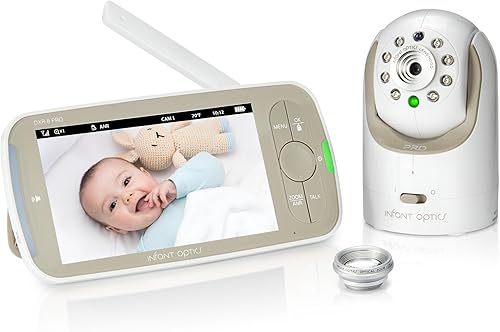
- 5 in HD video
- No Wi-Fi, app or cloud
- Active Noise Reduction
- Interchangeable lenses
A dedicated 5 in monitor and camera system for families who want private video without a router, app or cloud account.
Pros
- Active Noise Reduction filters constant background sounds
- Remote pan, tilt and zoom
- User-replaceable rechargeable battery
- Standard and optical zoom lenses included
Cons
- No Wi-Fi app access
- Wide-angle lens sold separately
- Indoor use only
Who should choose the DXR-8 Pro?
Choose the DXR-8 Pro if private local monitoring matters more than remote access. It fits a nursery where you want a parent monitor that works independently of home internet.
The included standard lens suits most rooms, while the included optical zoom lens helps show more detail from across the nursery. A wide-angle lens is available separately if you want a broader room view.
The camera is designed for indoor use and includes a camera unit, charging cable, instruction manual, monitor unit with rechargeable lithium-ion battery, mounting screws and anchor, optical zoom lens and power adapter.
How clear is the DXR-8 Pro video?
The DXR-8 Pro provides 720p video through a high-definition camera system. That resolution is suited to checking a baby's position, face and movement on the parent monitor.
In daily use, 720p helps you spot whether your baby is awake, settled or moving around the sleep space. It is aimed at practical checks rather than fine detail from far away.
The camera supports remote pan, tilt and zoom. You can change the view from the monitor instead of entering the nursery and disturbing the baby.
Pan and tilt are useful when the baby moves toward a corner or turns away from the first view. Zoom can bring the face closer without you standing over the cot in the dark.
Night vision supports viewing in total darkness. The camera uses an LED light source, and the parent unit provides the controls through push buttons and remote operation.
That means you can adjust the camera from bed or from another room. It also means testing the range in your own nursery before you rely on it at night.
Start by placing the camera where the sleep space fills the screen without too much wasted wall. Then check pan and tilt at the edges, since walls and furniture can limit movement.
Test night vision with the nursery lights off and the door closed. Look for a clear view of the baby and an angle that still works if the baby shifts position.
The zoom lens can help when the camera sits across the room. It gives a closer view for checking the face, while the standard lens suits a nearer placement.
Keep the lens clean with a soft dry cloth and avoid touching the glass with fingers. Dust or smudges can soften the image and make night viewing harder.
Remember that this is an indoor system for a nursery or another room inside the home. It is not designed for outdoor viewing or use in changing weather.
The controls are push button based on the parent unit. That keeps operation direct, but it is worth learning the buttons during the day so night use feels natural.
Volume and viewing position also matter for sleep. A clear image is helpful only if you can hear the baby and see the screen comfortably from where you sleep.
Does Active Noise Reduction help in a nursery?
Active Noise Reduction is useful when steady equipment noise competes with baby sounds. Fans, air purifiers, heaters and air conditioners can create a constant background layer, and Infant Optics says ANR filters those sounds.
ANR does not replace sensible monitor placement. Keep the camera positioned so the baby remains visible, and check the monitor's volume in the room where you'll hear it during the night.
Because the DXR-8 Pro has no Wi-Fi connection, its privacy and noise features work within the dedicated camera and monitor system. The trade-off is that alerts and video do not extend to a phone outside the home.
What are the lens options?
The DXR-8 Pro includes a standard lens and an optical zoom lens. You can choose the standard view for everyday nursery monitoring or change to the zoom lens when you need more detail from farther away.
The standard lens suits most nursery layouts where the camera sits fairly near the sleep space. It gives a balanced view for checking position and movement through the night.
The optical zoom lens suits a camera placed farther back, such as on a shelf or wall across the room. It helps bring the baby into closer view without moving the camera itself.
The wide-angle lens is sold separately. It may make more sense for a small room where you want to see more of the space, but check the camera position and viewing needs before adding another lens.
A wide view can help in a compact nursery where the cot and changing area sit close together. It can also help if the baby moves across a larger sleep space.
The interchangeable design is one of the system's main advantages over a fixed-view monitor. It lets one camera adapt to different nursery layouts without changing the whole monitor system.
That flexibility matters if you move the camera between rooms or rearrange furniture as your child grows. You can match the lens to the distance and room shape rather than accepting one fixed angle.
Swapping lenses is described as taking seconds. Still, it is worth doing the change during the day and testing the new view before bedtime.
After a swap, check that the baby remains centered and that pan and tilt still cover the needed area. A lens that suits one room may crop too much or show too little in another.
Store the unused lens in a clean dry place and keep it away from dust. Handling the lens by its edges can help protect the optical surface.
The add-on camera also supports interchangeable lenses, with zoom and wide-angle lenses sold separately. That lets extra rooms use different views while sharing one parent monitor.
For a first purchase, start with the included lenses and see how your room layout works. Add the wide-angle lens only if the standard view leaves part of the room unseen.
For everyday use, test each lens from the actual camera position. The best choice is the one that keeps the baby clear and centred through the night.
Can you add another camera to the DXR-8 Pro?
Yes. The system supports up to 4 cameras total, making the add-on camera useful for a second nursery, play area or sleep space.
You can switch feeds with the Camera button or use Scan Mode to rotate between connected rooms.
Infant Optics DXR-8 PRO Add-on Camera: Best for monitoring another room

- 720p HD video
- Remote pan, tilt and zoom
- Night vision
- Works with DXR-8 PRO only
An additional camera for an existing DXR-8 PRO system. It lets one parent monitor switch between rooms or use Scan Mode.
Pros
- Pairs with the DXR-8 PRO
- Remote thermometer
- Interchangeable lens support
- Wall mount and power adapter included
Cons
- Not compatible with the original 3.5 in DXR-8
- Zoom and wide-angle lenses sold separately
- Requires an existing DXR-8 PRO monitor
The add-on camera is compatible only with the Infant Optics DXR-8 PRO 5 in monitor. It is not compatible with the original DXR-8 3.5 in monitor, so check the model label before ordering.
Pairing takes place through the monitor's Camera Control menu. The camera supports 720p video, night vision, remote pan, tilt and zoom, a room thermometer and interchangeable lens support.
A wall mount and power adapter are included.
Read which add-on camera fits the Infant Optics DXR-8 or DXR-8 Pro if you're unsure which system you own.
Is the DXR-8 Pro good for multiple rooms?
The DXR-8 Pro works well for one parent unit serving several camera locations. Scan Mode can rotate between feeds, while manual switching lets you check a specific room when needed.
This approach is different from a split-screen system. If you want several camera views visible at the same time, compare a best split-screen baby monitor list before choosing.
An add-on camera is usually the simpler match when you already own the DXR-8 Pro monitor. A second full kit makes more sense when two caregivers need separate monitors at the same time.
For a broader look at system types, use our Baby Monitors: The Complete Buying Guide before deciding between local and Wi-Fi models.
How does it compare with Wi-Fi baby monitors?
The DXR-8 Pro is better for local privacy and simple dedicated use. It does not use Wi-Fi, an app or cloud storage, and the camera connects directly to the monitor.
A Wi-Fi model is more useful when you want phone access, remote viewing or app-based controls. It also depends on network equipment and account access, so compare those needs with your household routine.
Our best Wi-Fi baby monitor guide can help if viewing from outside the home is a priority. If you're comparing the earlier Infant Optics model, see Infant Optics DXR-8 vs Pro.
Another non-Wi-Fi option is covered in our Babysense baby monitor reviews, which may help when you want to compare monitor layouts and camera systems.
What happens when the monitor battery wears out?
The DXR-8 Pro's battery is user-replaceable, so a worn battery does not automatically mean replacing the whole monitor. The genuine battery listed here has a 3000 mAh capacity and is rechargeable.
Infant Optics DXR-8 PRO and PRO SS: Best for restoring monitor runtime

- 3000 mAh rechargeable lithium-ion battery
- Exclusive to PRO and PRO SS
- Tool-free installation
- Built-in safety protection
A genuine replacement battery for the DXR-8 PRO and PRO SS when the original battery no longer holds a charge.
Pros
- Designed for PRO models
- Overcharge and short-circuit safeguards
- Tool-free installation
- 1-year manufacturer's warranty
Cons
- Not compatible with the original DXR-8
- Only replaces the monitor battery
- Battery safety warnings require careful handling
The BP2304 battery is designed for the DXR-8 PRO and DXR-8 PRO SS models. It is not compatible with the original DXR-8, so confirm the monitor model before buying.
Installation is described as tool-free. Slide off the battery cover, disconnect the old battery connector, connect the replacement and close the cover.
Use the Infant Optics DXR-8 Pro battery replacement guide for model checks and replacement steps. Handle the lithium-ion battery carefully, and do not disassemble, crush, burn, puncture or short its contacts.
How should you set up the DXR-8 Pro?
Start with a clear camera view and a safe cable route. Place the camera so the baby remains visible, then keep the power cable away from the sleep space and follow the included instructions for mounting.
Use the monitor from the location where you'll normally watch the nursery. Test the viewing angle, pan and tilt range, night vision and sound level before settling into the nightly routine.
If the camera is wall-mounted, use the included mounting screws and anchor as directed. Keep the camera indoors, since the product data identifies it for indoor use.
The 4 x 6 x 3 in camera form factor and 0.9 kg item weight also make placement worth planning before drilling. Check the wall, outlet and viewing angle together rather than choosing a mount point by appearance alone.
Infant Optics DXR-8 Pro review verdict
The Infant Optics DXR-8 Pro is the best fit for families who want a private dedicated monitor without Wi-Fi. Its strongest points are direct FHSS communication, ANR, 720p video, night vision, remote camera movement and interchangeable lenses.
Choose the add-on camera if you already have the PRO monitor and need another room. Choose the genuine replacement battery if the PRO monitor no longer holds a charge.
If phone access is essential, choose a Wi-Fi system instead. If you want multiple feeds visible together, compare split-screen models before buying.
For the original 3.5 in DXR-8, verify compatibility carefully because the PRO add-on camera and PRO battery do not fit that older model.
Frequently asked questions
Is the Infant Optics DXR-8 Pro a Wi-Fi baby monitor?
No. The Infant Optics DXR-8 Pro uses a direct private signal with 2nd Gen FHSS between the camera and monitor.
It does not use Wi-Fi, an app, a cloud account or a router, so remote viewing over the internet is not part of this system.
Does the DXR-8 Pro have night vision?
Yes. The DXR-8 Pro provides night vision for viewing the nursery in darkness.
Its camera also supports remote pan, tilt and zoom from the parent monitor, so you can adjust the view without opening the nursery door.
Can the DXR-8 Pro use more than one camera?
Yes. The DXR-8 Pro can connect with up to 4 cameras total.
You can press the Camera button to switch feeds or use Scan Mode to rotate between rooms.
The DXR-8 Pro add-on camera works with the 5 in PRO monitor, not the original 3.5 in DXR-8.
Can you replace the DXR-8 Pro battery?
Yes. The DXR-8 Pro has a user-replaceable battery, and the genuine BP2304 battery is made for the DXR-8 PRO and DXR-8 PRO SS models.
Check the monitor model before ordering because this battery does not fit the original DXR-8.


