Infant Optics DXR-8 vs Pro: Which Should You Choose? (November 2026)
Choose the DXR-8 Pro for HD video, active noise reduction and a replaceable battery. Choose the original DXR-8 if 480p video and its established lens system meet your needs.
On this page (9 sections)
- Infant Optics DXR-8 vs Pro: what is the difference?
- Which monitor has better sound control?
- Which model has the better lens system?
- Which monitor is easier to keep running for years?
- Can you add cameras to either system?
- Which replacement adapter fits both models?
- How should you choose between the DXR-8 and DXR-8 Pro?
- What should you check before setup?
- Infant Optics DXR-8 vs Pro: final decision
Choose the DXR-8 Pro for 720p video, Active Noise Reduction and a replaceable battery. The original DXR-8 remains a strong choice if 480p video, non-WiFi privacy and interchangeable lenses cover your needs.
The Infant Optics DXR-8 vs Pro decision is mainly about video detail, background-noise control, battery serviceability and future camera expansion.
Both use a dedicated monitor instead of requiring a phone app. That approach suits parents who want the picture to appear at once, without opening an app or depending on a phone battery.
You carry the parent unit from room to room and leave the camera in the nursery. The trade-off is that you do not get smartphone viewing as the main screen.
The original DXR-8 gives you a 480p feed through a non-WiFi FHSS connection, with interchangeable lenses, remote pan, tilt and zoom, an LED sound bar, night vision and two-way talk.
Its compact monitor unit measures 0.9 inch deep, 3.1 inches wide and 4.8 inches long, which can feel handy when you move it around the house.
The DXR-8 Pro steps up to 720p video on a 5-inch display, 2nd Gen FHSS, patented Active Noise Reduction and a user-replaceable battery.
It includes standard and optical zoom lenses, so you can start with the standard view and swap for closer detail when you need it.
Active Noise Reduction is the clearest practical difference in daily use. The Pro filters steady sounds from fans, air purifiers, heaters and air conditioners, so the audio you hear focuses more on your baby.
The original relies on its LED sound bar and two-way talk for sound cues, with no equivalent filtering identified in its product information.
Battery planning also separates the two. A replaceable Pro battery can restore portability when the original wears down, rather than forcing a whole new monitor.
The original is still a proven, long-running design, but its product details do not list the same user-replaceable battery feature.
Expansion matters too. The Pro add-on camera is made only for the DXR-8 Pro and does not work with the original 3.5-inch system.
If you plan to watch more than one room later, that boundary should shape your choice now.
We compared the core features and the compatible accessories. Our score weighs specs, features and buyer feedback against what you're shopping for.
 Best for the original system
Infant Optics DXR-8 480p Video Baby Monitor

Infant Optics DXR-8 vs Pro: what is the difference?
The original DXR-8 has 480p video, while the DXR-8 Pro has 720p video and Active Noise Reduction. Both provide a private, non-WiFi monitoring setup with remote camera controls and interchangeable lens support.
The original DXR-8 uses a secure internal 2.4GHz channel with FHSS technology. It sends video and audio directly to its dedicated monitor without passing data through the internet.
The DXR-8 Pro uses a direct private signal with 2nd Gen FHSS. It also avoids WiFi, apps, accounts and cloud service, so the camera connects directly to the monitor unit.
The Pro's 5-inch HD display shows more video detail than the original's 480p feed. That difference may matter when you want to see small movements or check a darker room from farther away.
Infant Optics DXR-8 vs Pro for privacy
Both monitors suit buyers who want a dedicated, non-WiFi connection. Neither model depends on a phone, router or cloud account for everyday viewing.
That setup removes app loading and internet-based video transmission from the monitoring routine. You still need to follow the manufacturer's setup and security guidance for the camera and monitor.
A non-WiFi monitor also means you won't use smartphone viewing as the main display. If you want a phone app, these models are not designed around that type of access.
Which monitor has better sound control?
The DXR-8 Pro is the better choice when fans, air purifiers, heaters or air conditioners create background noise. Its patented Active Noise Reduction filters those constant sounds so the monitor can focus more on your baby's audio.
The original DXR-8 includes an LED sound bar and two-way talk. Those features help you notice sound changes and speak through the monitor, but the product information does not identify an equivalent Active Noise Reduction system.
This difference is most useful in a nursery with steady mechanical noise. In a quiet room, the Pro's ANR may matter less than the display resolution, battery condition or lens coverage.
The original DXR-8 still suits buyers who want a straightforward audio and video feed with remote controls. Use the monitor's sound features as part of your routine, not as a replacement for safe supervision.
Which model has the better lens system?
Both models let you change lenses, but the DXR-8 Pro includes standard and optical zoom lenses. The original DXR-8 supports normal, zoom and wide-angle lens options, with the wide-angle lens sold separately.
The original DXR-8 lets you switch between different viewing angles. Its zoom lens can provide a closer look, while the separate wide-angle lens can capture more of the room.
The DXR-8 Pro includes a standard lens and an optical zoom lens. Its zoom lens supports close-ups up to 6x with digital enhancement, while the wide-angle lens is sold separately.
Remote pan, tilt and zoom controls let you adjust the camera without entering the nursery. Place the camera so the useful viewing area remains clear, then use the lens that matches the room rather than relying only on digital zoom.
For a detailed look at the newer model, read our Infant Optics DXR-8 Pro baby monitor review. It covers the Pro's display, noise control, connection and daily buying considerations.
Which monitor is easier to keep running for years?
The DXR-8 Pro has the stronger battery service plan because its rechargeable battery is user-replaceable. The original DXR-8 has a rechargeable monitor and a long-standing design, but the supplied product information does not identify the same user-replaceable battery feature.
A replaceable battery can help you keep the monitor portable after the original battery wears down. You don't have to treat normal battery aging as an automatic reason to replace the entire Pro monitor.
The Pro includes a monitor unit with a rechargeable lithium-ion battery, along with its camera, charging cable, instruction manual, mounting screws and anchor, optical zoom lens and power adapter.
If you need a replacement screen rather than a complete kit, our guide to the Infant Optics DXR-8 Pro monitor only explains what to check before ordering. For battery care and replacement planning, see how to replace an Infant Optics DXR-8 Pro battery.
The original DXR-8 can still be a practical choice when its battery performance meets your routine. Keep the monitor charged according to its instructions, and avoid placing the cable where it can become a hazard.
Can you add cameras to either system?
The DXR-8 Pro supports its dedicated add-on camera, while the DXR-8 Pro add-on camera does not work with the original DXR-8. This compatibility boundary is one of the most important differences for families planning to monitor more than one room.
The Infant Optics DXR-8 Pro add-on camera provides 720p video, night vision, remote pan, tilt and zoom, a remote thermometer and interchangeable lens support. It pairs with the DXR-8 Pro monitor and supports up to 4 cameras total with one Pro monitor.
Use the add-on camera when one parent monitor needs to cover several rooms. The monitor can switch feeds with the Camera button or rotate between cameras with Scan Mode.
The add-on camera is not a way to upgrade the original DXR-8 system. If your parent unit is the original 3.5-inch model, confirm compatibility before ordering any additional camera.
For families comparing multi-camera layouts, our guide to the best two-camera split-screen baby monitor explains how split-screen viewing changes the monitoring routine. You can also read whether the Infant Optics DXR-8 Pro can show a split screen.
Which replacement adapter fits both models?
The Infant Optics Official Power Cord Adapter fits the camera unit of both the DXR-8 and DXR-8 Pro. It does not power either monitor unit.
This genuine Infant Optics accessory is designed for the camera unit placed in the baby's room. It is a single corded electric adapter made for the DXR-8 and DXR-8 Pro camera units.
Check which part needs power before buying. The camera adapter and handheld monitor adapter serve different units, so a camera-unit replacement won't solve a monitor charging problem.
It also fits the DXR-8 Pro add-on camera unit, which shares the same camera-side power need. That makes it useful to keep as a spare for the nursery camera rather than for the handheld screen.
Keep the cord routed away from the crib and other areas where a child could pull or chew it. Follow the system manual for placement and electrical safety.
How should you choose between the DXR-8 and DXR-8 Pro?
Pick the original DXR-8 if you want its 480p non-WiFi system and do not need the Pro's sound filtering or battery replacement. Its interchangeable lenses, remote pan, tilt and zoom, LED sound bar, night vision and two-way talk cover the main monitoring tasks.
Pick the DXR-8 Pro if you want 720p video, Active Noise Reduction, 2nd Gen FHSS and a user-replaceable battery. It is also the better foundation for adding compatible cameras because the DXR-8 Pro add-on camera does not work with the original model.
The original DXR-8 monitor unit measures 0.9 in deep, 3.1 in wide and 4.8 in long. Its compact monitor may suit you if you carry it around the house and value a smaller dedicated unit.
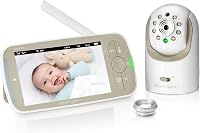
The DXR-8 Pro is a dome-form indoor baby monitor system with a 5-inch HD video display and a camera unit with an aluminum lens hood. Its package includes one camera and one monitor unit.
Neither model requires WiFi for its direct monitoring connection. Choose based on the features you will use every night, not only the model name.
What should you check before setup?
Choose the camera position, lens and cable route before mounting the unit. A clear view and safe cord placement matter more than adding features you won't use.
Place the camera where the selected lens covers the sleeping or play area without forcing the monitor to sit at an awkward angle. Use the remote pan, tilt and zoom controls to fine-tune the view from the parent unit.
If you choose the Pro, start with the included standard lens for most rooms. Use the optical zoom lens when you need more detail from across the nursery, or add the separate wide-angle lens when the room requires broader coverage.
Keep the camera cable secured and away from the crib. Use the included mounting hardware only as directed, and follow the manual for the final position.
The Pro's blue LED indicators can be easier to understand once you know what they show. Our guide explains what the blue LED lights on an Infant Optics DXR-8 Pro mean.
Infant Optics DXR-8 vs Pro: final decision
Choose the DXR-8 for a compact, non-WiFi 480p monitor with interchangeable lenses. Choose the DXR-8 Pro for 720p video, Active Noise Reduction, a replaceable battery and a compatible multi-camera path.
If you already own the original DXR-8, upgrade when one of those Pro features solves a real problem in your nursery.
A noisy room with a fan or air conditioner running all night is a good example, because Active Noise Reduction filters those steady sounds.
Wanting a clearer picture is another reason to move up. The Pro's 720p feed on a 5-inch display shows more detail than the original 480p feed, which can help when you check small movements from across the room.
Battery wear can also prompt an upgrade. The Pro's user-replaceable battery lets you restore portability in seconds when the original battery ages.
That is a practical benefit if you plan to carry the monitor around the house for years.
If you are starting from scratch, the Pro offers more room to expand. Its add-on camera works only with the DXR-8 Pro, supports up to 4 cameras total with one monitor, and can switch feeds or rotate in Scan Mode.
The original cannot use that add-on camera, so multi-room plans point toward the Pro.
The original remains the simpler fit for buyers who do not need those upgrades. Its interchangeable lenses, remote pan, tilt and zoom, LED sound bar, night vision and two-way talk cover the main monitoring tasks without adding complexity you may not use.
Its compact monitor also suits smaller spaces and frequent carrying. At 0.9 inch deep, 3.1 inches wide and 4.8 inches long, it is designed to move with you rather than sit fixed on a nightstand.
Neither model requires WiFi for its direct monitoring connection. Both keep video and audio off the internet and away from apps, accounts and cloud service, which suits parents who prefer a private, dedicated link.
Choose based on the features you will use every night, not only the model name. Think about room noise, how far you sit from the nursery, how long you expect to keep the system, and whether you may add a second camera.
Set the camera position and lens before you judge either system. A standard lens suits most rooms, an optical zoom lens helps for closer detail, and a separate wide-angle lens can cover more of a larger room.
For broader feature comparisons, start with our best baby monitor system buying guide. It can help you compare this dedicated-monitor approach with other baby monitor setups.
Frequently asked questions
What is the main difference between the Infant Optics DXR-8 and Pro?
The main difference is video and sound technology. The original Infant Optics DXR-8 provides 480p video through a non-WiFi FHSS connection, while the DXR-8 Pro provides 720p video, 2nd Gen FHSS, Active Noise Reduction and a user-replaceable battery.
Is the Infant Optics DXR-8 Pro worth upgrading from the DXR-8?
The DXR-8 Pro is the stronger upgrade if you want 720p video, Active Noise Reduction or a battery you can replace. If the original DXR-8 already gives you the image, privacy and lens coverage you need, its 480p video and dedicated monitor may still fit your routine.
Can the original DXR-8 use the DXR-8 Pro add-on camera?
No. The Infant Optics DXR-8 Pro add-on camera is compatible with the DXR-8 Pro only and does not work with the original DXR-8 3.5-inch system.
Check the model label on the parent monitor before buying an additional camera.
Does the Infant Optics DXR-8 Pro use WiFi?
No. The DXR-8 Pro uses a direct private signal with 2nd Gen FHSS and does not connect to WiFi, an app, an account or cloud service.
The original DXR-8 also operates without WiFi through an internal 2.4GHz FHSS connection.