Nanit vs Owlet Baby Monitor: Which Should You Choose? (November 2026)
Choose Nanit for camera-based viewing and Owlet for wearable pulse and oxygen tracking. Your best choice depends on whether you need visual monitoring, wellness data, or both.
On this page (8 sections)
Choose Nanit for camera-based viewing and Owlet for wearable pulse and oxygen tracking. The nanit baby monitor vs owlet decision depends on the kind of information you need during naps and overnight sleep.
If your first thought at night is whether your baby is awake or settled, a camera view will answer that quickly. You can check the crib area without opening the nursery door or turning on a light.
If your first thought is whether your baby's readings are within the expected range, a wearable sensor fits that question better. It gives a different kind of check, based on pulse and oxygen rather than sight or sound.
Nanit is the better fit when you want to look into the nursery, check positioning and use a camera-centered setup. It suits parents who like visual context and want to see movement, posture and the room around the sleep space.
Owlet Dream Sock is the better fit when pulse and oxygen readings, preset-zone alerts and sleep trends matter more than a camera view. It suits parents who want wellness data to guide when they get up and check.
The two approaches are not interchangeable. One emphasizes visual access to the room, while the other adds a wearable sensor and wellness data.
That split matters in daily use. A camera tells you what is happening in the room, but it does not measure pulse or oxygen.
A Sock measures those readings, but it does not show you the room.
Consider your night routine before you compare features. If you already listen for cries from the next room, an audio cue may be enough, and video may be a bonus rather than a need.
If you wake often and want reassurance, the type of reassurance matters. Some parents calm down when they can see their baby, while others calm down when they see readings stay in range.
Think about who will use the system most. A partner, grandparent or night helper may prefer a simple camera check to an app with several charts and alerts.
Think about the room setup too. A camera needs a stable position with a clear line to the crib or bassinet.
A wearable needs a correct fit and a charged Base Station within reach.
Neither choice removes the need for care. Any monitor is a tool for checking, not a substitute for visiting your baby or seeking medical advice when you are worried.
Use this guide to match the tool to your main concern. Seeing your baby and tracking wellness data solve different problems, even when both are sold as baby monitors.
If you need both kinds of information, plan for two separate systems and check how their apps and alerts will work together. That adds cost and setup work, so be honest about whether you will use both each night.
Also consider how much attention you want to give at night. A camera view waits for you to open it, while sensor alerts can reach you without looking at a screen.
That difference can shape your sleep. It can also shape who in the household finds the system easy to use.
Small details add up over weeks. Placement, charging and nightly fit all affect whether a monitor helps or becomes another task.
Starting with your main concern keeps the choice clearer. You can then compare setup, cost and extra features with that need in mind.


Nanit vs Owlet baby monitor: what is the main difference?
Nanit centers on camera monitoring, while Owlet centers on wearable health data. Start with the type of information you expect to check before comparing app features or setup details.
A camera can help you see your baby's position and the nursery environment. It also gives you visual context when sound alone does not explain why your baby stirred.
That visual context is useful in small moments. You can tell if a blanket has shifted, if a toy is in the way, or if your baby is simply resettling after a brief wake period.
A camera also helps during evening routines. You can watch the transition from play to sleep without hovering in the doorway or opening the door after your baby has just settled.
Owlet Dream Sock wraps around the baby's foot and tracks pulse rate and oxygen levels in real time. It sends alerts to the Base Station and phone when readings leave preset zones.
Those alerts work differently from a camera feed. They are tied to the sensor readings, so the question is not what the room looks like, but whether the measured values need attention.
The Sock is designed for healthy infants 1 to 18 months weighing 6 to 30 lb. Check that your child fits those limits before you plan your nights around it.
Fit matters for daily use. A Sock that is too loose may not sit well, and one placed incorrectly may give you connection or fit warnings instead of useful readings.
The Base Station is part of the system, not an extra. It needs a place in the room, power, and a connection that lets alerts reach you where you sleep.
That means the best system depends on your concern. Choose a camera-first approach when seeing your baby is the main need.
Choose Dream Sock when wellness readings are the reason you are shopping.
A camera-first setup can also suit shared care. Another adult can open the view and check the room without needing to understand sensor zones or sleep charts.
A sensor-first setup can suit parents who wake to sounds and want a clearer reason to get up. The alert gives you a prompt to check, rather than a restless half-awake guess.
Look at setup effort as part of the difference. A camera needs mounting or placement and a view of the whole sleep space.
A Sock needs nightly fitting, charging and a phone or Base Station alert plan.
For the wider choice between audio, video, local and connected monitors, see our best baby monitor system guide. Use it if you are still unsure whether a camera or a wearable is the right starting point.
Which system gives you more useful information?
Nanit gives visual information, while Owlet adds pulse and oxygen readings. More data isn't automatically better if you won't use it or if the setup makes nightly checks harder.
A camera view helps you check whether your baby is awake, moving or settled. It can also show the crib or bassinet area without requiring you to enter the room.
Dream Sock adds readings that a standard camera can't provide. Its alerts are tied to preset pulse and oxygen zones rather than sound or movement alone.
Owlet's product information describes Dream Sock for healthy infants 1–18 months weighing 6–30 lb. Check that your child fits those limits before choosing it.
Dream Sock isn't a replacement for medical care. If you have concerns about your baby's health, ask a qualified health professional rather than relying on any consumer monitor.
Nanit vs Owlet monitor alerts
Choose Nanit if visual or sound changes are your main alert concern, and choose Owlet if preset-zone wellness alerts are the priority. Read each alert type as a prompt to check your baby, not as a diagnosis.
Owlet's red alert indicates readings outside preset zones. Other light colors can indicate fit or connection issues, so the sock must be positioned and connected correctly.
For camera systems, place the camera where the sleep space remains visible. Avoid a position that leaves part of the crib or bassinet hidden behind rails, bedding or furniture.
Which one is easier to set up?
Nanit requires a suitable camera position and connected setup, while Owlet requires the sock, Base Station, phone and 2.4 GHz Wi-Fi. Your home network and nursery layout may decide this more than the brand name.
Owlet Dream Sock connects to the Base Station through Bluetooth. The Base Station uses 2.4 GHz Wi-Fi, and setup requires your phone or tablet and the Base Station to use that band.
After setup, your mobile device can return to a 5 GHz network while the Sock remains on 2.4 GHz. A 5 GHz-only network will not meet the stated setup requirement.
Nanit setup also needs careful camera placement. The camera should provide a clear view without creating a reachable cord or an unstable mounting position.
For a floor-mounted setup, the CaGuan stand adjusts from 37.4 to 69 inches and is designed for listed cameras including Nanit Pro and Flex. It uses a metal pole mount and a heavy-duty base, but the camera still needs its own power connection.
See our Nanit baby monitor stand guide for floor, wall and Flex mounting choices.
What are the ongoing costs?
Owlet has a clearly stated subscription point after the included 3 months of Owlet 360, while a Nanit setup may also involve paid features depending on the exact model and service plan. Check the current terms for the specific system before you buy.
The Owlet package includes 3 months of Owlet 360. After that period, continued access to premium features requires an active subscription and auto-renews until canceled.
Those premium features include personalized morning reports, long-term sleep and health trend tracking, and age-based comparisons. Decide whether those reports are worth an ongoing fee for your household.
A Nanit system can also have model-specific app features or service terms. Compare the exact camera package, included access and renewal terms instead of assuming every Nanit product works the same way.
For a focused look at one camera, read our Nanit Pro baby monitor review.
Which option protects privacy better?
Choose a local monitor when avoiding Wi-Fi is your main privacy goal. Nanit and Owlet are connected approaches, while the local alternatives below avoid home Wi-Fi.
Owlet uses Bluetooth between the Sock and Base Station, then 2.4 GHz Wi-Fi for connected monitoring. Its data protection includes 256-bit encryption and elliptic curve authentication.
A no-Wi-Fi monitor keeps the camera or audio connection within its own system. That can simplify setup, but it also means you won't get the same phone-based access as a connected monitor.
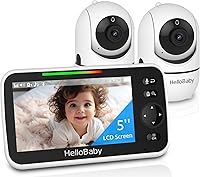
The HelloBaby HB6550 uses 2.4 GHz FHSS technology rather than home Wi-Fi. Its camera provides 355° horizontal and 120° vertical movement, while the screen supports up to 4 cameras from the listed HB6550 family.
For audio-only monitoring, the VTech unit uses DECT 6.0 and no Wi-Fi, cloud or account. Its parent unit has an 8-hour rechargeable battery, a belt clip and a stated 1,000 ft range.
Which monitor is better for travel?
Choose the system that matches the network and power conditions at your destination. A connected monitor needs suitable Wi-Fi, while a local monitor needs its own camera-to-screen or audio-unit connection.
Owlet requires 2.4 GHz Wi-Fi during setup and has a 16-hour Sock battery. Pack the Base Station, charging equipment and phone, and confirm that the destination network can support the setup.
A Nanit travel setup also needs a stable camera position and power. Use a safe mount and keep cords away from the sleep space.
For a no-Wi-Fi video option, the HelloBaby screen has a 30-hour battery, while the camera needs to remain plugged in. Its tabletop or wall-mounting options can suit different rooms.
Read which Eufy baby monitors support Wi-Fi and phone viewing if phone access is part of your wider comparison. For a local connection across rooms, our best long range baby monitor guide is another useful next step.
Can you use one system for 2 babies?
A camera setup may be easier to expand visually, but every added device increases placement and monitoring work. Choose a system that lets you check each sleep space clearly without confusing alerts.
Two babies rarely sleep on the same schedule. One may be in deep sleep while the other is awake, crying or ready to feed, so separate views can stop one room from masking the other.
The HelloBaby HB6550 supports expansion up to 4 cameras from the listed compatible family. That can help when each baby sleeps in a separate room or when one room needs more than one angle.
Expansion is not just about buying more cameras. Each added camera needs power, a stable position and a clear view, and each view adds another screen or app view to check at night.
If your babies share a room, one camera may cover both sleep spaces if the angle is right. If they are in separate rooms, plan how you will switch between views without missing an alert from the other room.
A Nanit setup for 2 babies needs careful planning around camera placement, app views and account features. Our guide on how to choose a Nanit monitor setup for two babies explains the main layout questions.
Start with the rooms. Note where each crib or bassinet sits, where power outlets are, and where a camera can sit without a cord crossing the sleep space.
Then think about alerts. It helps to know which room is making noise before you walk down the hall, especially if one baby is a light sleeper and the other is noisy at night.
Owlet Dream Sock is designed around a wearable Sock and Base Station. If you are considering monitoring more than one infant, confirm the exact multi-child support and required equipment before ordering.
Do not assume one Base Station or one app setup will cover two children in the way you expect. Check the current product details for your exact package before you rely on it.
Each Sock also needs its own fit and charge routine. That can mean two socks to fasten, two batteries to manage and two sets of alerts to sort out when both babies stir.
For other families, a camera in each room may be simpler. You can check each space visually and keep the nightly routine closer to what you already know.
Choose the system that keeps each sleep space clear and each alert easy to place. If you cannot tell which baby needs you, the system is adding work rather than peace of mind.
Which should you choose?
Pick Nanit if you want a camera view of the nursery, and pick Owlet if pulse and oxygen tracking are the reason you're shopping. Pick a local VTech or HelloBaby system if no-Wi-Fi monitoring matters more than phone access or wellness data.
Choose Nanit when you expect to look at the sleep space often, need visual context and can provide a safe camera position with the required connection. A compatible floor stand can help when drilling isn't suitable.
Choose Owlet Dream Sock when your child fits the stated age and weight range and you want real-time pulse and oxygen readings with Base Station and phone alerts. Include the subscription decision in your total ownership plan.
The clearest nanit baby monitor vs owlet rule is simple: Nanit is the camera choice, Owlet is the wearable wellness choice. If neither answers your main need, a no-Wi-Fi audio or video monitor may be the better match.
Frequently asked questions
Is Nanit better than Owlet?
Nanit is better for families who want a camera view of the nursery, while Owlet Dream Sock is better for parents who want pulse and oxygen readings with alerts. They serve different monitoring needs, so choose based on whether seeing your baby or tracking wellness data matters most.
What is the main difference between Nanit and Owlet?
Nanit focuses on camera-based baby monitoring, while Owlet Dream Sock uses a wearable sock to track pulse rate and oxygen levels. Owlet also sends alerts through its Base Station and phone, while a camera system is centered on viewing and listening.
Does Owlet require a subscription?
This Owlet Dream Sock package includes 3 months of Owlet 360. Continued access to its premium insights, including daily morning reports and long-term wellness tracking, requires an active subscription after that period.
Can Nanit and Owlet work together?
A Nanit camera and Owlet Dream Sock can address different parts of monitoring, but compatibility depends on the exact setup and apps. Treat them as separate systems unless the manufacturers confirm a direct integration for your devices.
Which baby monitor is better for travel?
A travel choice depends on your access to Wi-Fi, power and a stable place to position the camera. Read our guide to Nanit baby monitor travel before packing a Nanit system, and consider a local monitor if you want to avoid hotel Wi-Fi.