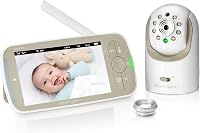
Can the Infant Optics DXR-8 Pro Show a Split Screen?
The Infant Optics DXR-8 Pro does not show a split screen with two cameras at once. It shows one camera at a time on its 5 inch monitor, and you switch between cameras or use Scan Mode to rotate.
On this page (9 sections)
- Does the Infant Optics DXR-8 Pro split screen work with multiple cameras?
- How do you switch between cameras on the DXR-8 Pro?
- Which DXR-8 Pro variants support more than one camera?
- What does the standard DXR-8 do differently?
- How do you add a camera without a split screen?
- What are the trade-offs of no split screen?
- Can a replacement monitor change the screen layout?
- What should you buy if you really want two rooms covered?
- How do you decide between switching and split screen?
The Infant Optics DXR-8 Pro does not show a split screen with two cameras at once. It shows one camera at a time on its 5 inch monitor, and you switch between cameras or use Scan Mode to rotate.
If you want true split screen, this model will not give you that view.
That matters most if you plan to watch a nursery and a playroom, or twins in separate rooms, at the same time. The DXR-8 Pro can pair with several cameras, but the screen layout stays single view.
We compared the Pro kit, the add-on camera, and the original DXR-8 to explain what you actually get and how switching works.
Does the Infant Optics DXR-8 Pro split screen work with multiple cameras?
No, multiple cameras do not create a split screen on the DXR-8 Pro. One paired camera fills the display at a time, while other cameras stay connected in the background.
This is different from some WiFi systems that tile two or four feeds on a phone or tablet. The DXR-8 Pro uses a dedicated monitor unit with no app, so the display stays simple.
Infant Optics says you can connect up to 4 cameras total to one DXR-8 Pro monitor. That limit is about pairing, not about showing all 4 at once.
Think of each camera as a channel. The monitor tunes to one channel at a time.
That design keeps controls plain and avoids the lag of opening an app. It also means a second room is only visible when you select it or when Scan Mode lands on it.
For one nursery, that trade off feels fine. For two active rooms, it can feel limiting.
How do you switch between cameras on the DXR-8 Pro?
You switch with the Camera button, or let Scan Mode rotate for you. That is how you check a second room.
Press the Camera button to move to the next paired camera. Each press changes the room on screen, and pan, tilt and zoom then apply to that camera.
Scan Mode switches automatically on a timer, so you can listen while it cycles without pressing buttons.
The limit is timing. A sound in another room will not appear until the cycle reaches that camera.
Use Scan Mode as a check in tool, not side by side monitoring. Our guide to the best baby monitor system covers how other types handle multi room viewing.
Which DXR-8 Pro variants support more than one camera?
The DXR-8 PRO kit and the DXR-8 PRO Add-on Camera form a multi camera set. The original DXR-8 does not pair with the Pro add on.
The Pro kit has a 5 inch HD monitor and one camera. The add on matches the kit camera, with 720p video, night vision, remote pan, tilt and zoom, a remote thermometer, and interchangeable lens support.
Compatibility matters most. The add on works only with the DXR-8 PRO 5.0 inch monitor, not the original DXR-8 3.5 inch monitor.
Check the label on your parent unit before ordering.
The Pro also differs from the standard model, with 2nd Gen FHSS, Active Noise Reduction, a 720p feed, and a user replaceable battery.
What does the standard DXR-8 do differently?
The standard DXR-8 is a 480p, non WiFi monitor built around interchangeable lenses and pan, tilt and zoom. It suits one room, not split screen.
It offers Non WiFi Hack Proof FHSS Connection, Interchangeable Lenses, Pan Tilt Zoom, LED Sound Bar, Night Vision, and Two Way Talk. With no WiFi, there is no app loading time and no phone needed, and no video or audio passes through the internet.
You can swap normal, zoom, and wide angle lenses, with wide angle sold separately. The monitor measures 3.1 by 4.8 by 0.9 inches, so it is easy to carry around the house.
If you own the standard DXR-8, do not buy the Pro add on for it. To choose between them, see the infant optics dxr 8 vs pro comparison.
When is the standard DXR-8 the better pick?
Choose the standard DXR-8 if you want a smaller monitor and a lower resolution feed for one room. Its 480p video is softer than the Pro 720p feed, but it still covers night vision, two way talk and lens swaps.
Buyers often mention the long track record and dependable sound and video of this model. The maker says it was awarded Best Baby Monitor Overall in 2022 by NBC News.
Treat that award as context rather than a guarantee for your home.
When is the DXR-8 PRO the better pick?
Choose the Pro if you want 720p HD, Active Noise Reduction, and a replaceable battery. Active Noise Reduction filters out fans, air purifiers, heaters and air conditioners so you hear your baby more clearly.
The Pro also uses a direct private signal with 2nd Gen FHSS. There is no WiFi, no app, no cloud and no account.
That design appeals to parents who want a private link between camera and monitor only.
How do you add a camera without a split screen?
Add a camera through Menu, Camera Control, then Add Camera, and hold Pair until the light flashes. Infant Optics says it takes about a minute.
Plug in the new camera and turn on the monitor. Go to Menu, then Camera Control, then Add Camera, then hold Pair on the camera until the light flashes.
Place the camera after pairing and check the view on the monitor. Use pan, tilt and zoom to frame the crib or play area.
Swap lenses for detail or a wider view, with the wide angle lens sold separately.
For help choosing, see which add-on camera fits your DXR-8 or DXR-8 Pro, since Pro and standard cameras are not interchangeable.
How many cameras can one Pro monitor hold?
One DXR-8 Pro monitor can hold up to 4 cameras total. That includes the camera from the kit plus up to 3 extra add on cameras.
More cameras mean more rooms checked, but still one view at a time. Each extra camera needs its own power adapter and a spot with a clear view.
Test the angle from the monitor before you mount it for good.
If two caregivers need to watch at the same time, Infant Optics says a second full kit may make more sense. The add on is the smarter choice for most families who only need one monitor to move between rooms.
What are the trade-offs of no split screen?
The main trade off is instant awareness of two rooms at the same time. You gain a simple, private, non WiFi system, but lose side by side viewing.
Sound needs planning too. The monitor shows only the selected camera, so if Scan Mode is elsewhere, you may miss the start of a sound cue.
Many parents keep the nursery as default and check the second room on demand.
The Pro has a user replaceable battery, so you can restore runtime without buying a new monitor. Our guide to infant optics dxr-8 pro battery replacement explains the swap.
Privacy is the benefit many weigh against split screen. The Pro never connects to the internet or a cloud, so that direct signal may make single view a fair deal.
Can a replacement monitor change the screen layout?
No, a replacement monitor does not add split screen to the Pro system. It gives the same single view on a fresh unit.
If your monitor is damaged or worn, a monitor only option can cost less than a full kit. Our guide to infant optics dxr-8 pro monitor only helps you check fit before ordering.
Make sure any replacement is for the DXR-8 PRO, not the standard DXR-8. The models differ in size, resolution and features, so a wrong generation will not give you the HD feed, Active Noise Reduction or replaceable battery.
Use lens choice to make one view count. Zoom helps across a large nursery, while wide angle helps when the camera sits close to a crib.
What should you buy if you really want two rooms covered?
Buy a Pro kit plus one Pro add on camera for two rooms, and accept camera switching. That is the closest this system gets to multi room split screen.
Set the nursery as your main camera and the second room as your check in camera. Use Scan Mode for automatic rotation during naps, or the Camera button for manual control and faster checks.
If side by side viewing is a must, look at a different system type before buying more cameras. Adding cameras will not create split screen.
Buy a second full kit only if two people need independent monitors at once.
For one nursery, the kit alone is enough. For twins in one room, one camera with a wide angle lens may cover both cribs.
How do you decide between switching and split screen?
Pick the DXR-8 Pro if you value privacy, HD video and simple controls more than side by side views. Pick a split screen system if you need to see two rooms at once without switching.
Check your room count first. One room favors the Pro kit alone.
Two rooms favor the kit plus add on camera with Scan Mode. Three or four rooms still work on the Pro, but switching gets slower and Scan Mode delays get longer.
Check your priority next. No WiFi, no app and a direct FHSS signal favor the Pro.
Instant multi room tiling favors a different design. Check your generation last.
If you own the standard DXR-8, Pro add on cameras will not fit. The answer remains clear: the Pro does not offer split screen, but it is a strong private nursery monitor with HD video, night vision, pan tilt zoom and a replaceable battery.
Frequently asked questions
Does the DXR-8 Pro show two cameras side by side?
No. The DXR-8 Pro monitor shows one camera feed at a time.
It can pair with up to 4 cameras, but only one view fills the screen.
You switch feeds with the Camera button or let Scan Mode rotate through them.
Can I add a second camera to my DXR-8 Pro?
Yes. The DXR-8 PRO Add-on Camera pairs only with the DXR-8 PRO, not the original DXR-8.
It gives you the same 720p, night vision, pan, tilt, zoom, thermometer and interchangeable lens support as the kit camera.
Is there a way to watch two rooms without picking up the monitor?
Scan Mode is the closest option. It rotates between paired cameras on a set interval, so you do not need to press a button each time.
It still shows one room at a time, so instant side by side viewing is not possible.