Nanit Pro Baby Monitor Review: Worth It? (November 2026)
The Nanit Pro is a strong choice if you want a smart camera with flexible mounting options, but it depends on a phone-based setup. Choose a no-WiFi monitor if you want a dedicated parent screen.
On this page (11 sections)
- Nanit Pro baby monitor review: the short answer
- What makes the Nanit Pro setup different?
- Best Nanit Pro mount for adjustable placement
- Can you use a Nanit baby monitor for travel?
- Is Nanit Pro better than a no-WiFi monitor?
- Best alternative for simple audio monitoring
- Best alternative with a dedicated video screen
- Can you view a Nanit baby monitor on a PC?
- Can one Nanit setup monitor two babies?
- What should you check before buying the Nanit Pro?
- Nanit Pro baby monitor review: final verdict
The Nanit Pro baby monitor is best for parents who want a smart camera with flexible mounting, especially in a nursery where a phone-based viewing setup fits your routine. Its main trade-off is that it does not replace the simplicity of a dedicated parent screen.
The mounting choice matters almost as much as the camera. A wall mount can create a fixed view, while a floor or flex-style mount can help when you rent, rearrange the nursery or want to avoid wall damage.
Nanit Pro baby monitor review: the short answer
The Nanit Pro stands out when you want a camera-centered monitoring system with more than one way to position it. It suits a permanent nursery setup best when you already know where the camera should look and where power will run.
Before choosing it, decide whether you want smart monitoring through a phone or a separate screen that works without WiFi. Our Baby Monitors: The Complete Buying Guide explains how those two approaches differ.
This review compares the Nanit Pro setup with three related choices. The Didalo mount addresses placement, the VTech focuses on audio, and the HelloBaby provides video through a dedicated no-WiFi screen.
Our score weighs specs, features and buyer feedback against what you're shopping for.
What makes the Nanit Pro setup different?
The Nanit Pro is most useful when mounting and viewing fit your nursery together. A camera can have a clear position, but the setup still needs a safe place for the mount, a practical power route and a viewing method that works during nighttime checks.
A wall mount can keep the camera position consistent. It may suit a crib that stays in one place, but it requires more planning and may not suit a rental or a nursery that changes often.
A floor stand can give you more freedom to adjust the camera location. It also takes floor space, so measure around the crib and walking paths before choosing one.
A flex-style mount can be useful when you need a smaller mounting footprint. The right option depends on whether you value a fixed installation, adjustable height or easier repositioning.
For a closer comparison, see Which Nanit Mount Should You Choose: Floor, Wall, or Flex?.
Which Nanit Pro mounting option should you choose?
Choose a wall mount for a stable, permanent position, a floor stand for adjustable placement without wall damage, and a flex mount when you want a compact alternative. Keep the camera view clear and route the power cable away from the crib.
The floor option needs enough room around its base. A wall option needs a suitable surface and careful cable planning.
A flex option needs a secure attachment point that remains stable after installation.
Do not choose a mount only because it looks tidy. Check the camera angle from the baby's sleep space, the reach of the cable and whether adults can move around the room without brushing against the setup.
Best Nanit Pro mount for adjustable placement
Didalo Floor Stand for Nanit Pro Baby: Best for flexible Nanit placement

- Adjustable height from 37.4 to 68.8 in
- Gooseneck swivel holder
- Heavy-duty base
- Compatible with Nanit Pro
A flexible floor mounting option for Nanit Pro owners who want adjustable height without wall damage. The camera is not included.
Pros
- Adjustable height
- Heavy-duty base
- No wall installation
- Made for Nanit Pro
Cons
- Camera is not included
- Floor space is required
The Didalo Floor Stand for Nanit Pro Baby is the most flexible choice here for parents who want to change camera height without wall installation. Its height adjusts from 37.4 to 68.8 inches, giving you a wide range for different room layouts.
The stand has a gooseneck swivel holder and a heavy-duty base. Its solid iron construction is intended to make the stand more stable, while the adjustable design lets you set the camera position around the nursery.
Didalo says the stand is compatible with Nanit Pro, Nanit Plus and Nanit Original cameras. The camera is not included, so this is a mounting choice for someone who already has a compatible camera.
The stand also has a Type-C charging port and an integrated temperature and humidity sensor. Those details may matter if you want the mount to handle more of the setup around the camera.
Choose it when you rent, avoid wall damage or expect to change the crib position. Skip it if your room has little floor space or you want the smallest possible mounting footprint.
Can you use a Nanit baby monitor for travel?
A Nanit travel setup works best when you plan the mount, power route and viewing position before leaving home. For other options, see our baby monitors for travel.
A familiar camera may be convenient, but the same nursery arrangement may not exist in a hotel room, rental or family home.
Check whether the destination has a stable surface or a safe place for the selected mount. Keep cords away from the baby's sleep space, and avoid placing a stand where adults may trip over its base.
Pack the mounting parts together with the camera accessories you need. A separate pouch can help prevent small pieces from getting lost between rooms.
If you want more travel-specific planning, read Can You Use a Nanit Baby Monitor for Travel?.
A dedicated no-WiFi monitor may be simpler for occasional trips because the camera and parent screen are designed to work as one system. That does not automatically make it better, but it can reduce the number of setup decisions.
Is Nanit Pro better than a no-WiFi monitor?
The Nanit Pro is a better fit for smart-camera features and phone-based viewing, while a no-WiFi monitor is better for a direct setup with a separate screen. The choice depends on how you want to check the nursery at night.
A smart monitor can fit households that already use a phone for alerts and viewing. It may feel less convenient if you want to keep your phone free, avoid app-based monitoring or use a monitor in a place with unreliable WiFi.
A no-WiFi model creates a different routine. You turn on the camera and parent unit, then monitor from the dedicated screen or audio receiver.
For a second opinion, compare Nanit vs Owlet Baby Monitor: Which Should You Choose?. The key question is not which brand sounds more advanced.
It is which viewing method you'll actually use consistently.
Best alternative for simple audio monitoring
VTech Audio Baby Monitor: Best for simple audio monitoring

- DECT 6.0 audio
- 8-hour battery
- 1,000 ft range
- 5-level sound indicator
A dedicated audio monitor for parents who prefer a direct connection without an app, cloud account or WiFi setup.
Pros
- No WiFi or account
- Belt clip
- Visual sound indicator
- Automatic setup
Cons
- Audio only
- Parent unit battery lasts up to 8 hours
The VTech Audio Baby Monitor is the simplest alternative when you mainly need sound. Its DECT 6.0 connection is designed for audio without WiFi, an account or cloud setup.
The parent unit has an 8-hour battery, a belt clip and a stated range of up to 1,000 feet. Five LED lights show sound levels when the speaker is muted, which can help you check activity without waking a partner.
The system includes a baby unit, parent unit, adapters and a quick start guide. AAA batteries are included as backup power, while the parent unit uses a rechargeable battery.
The VTech suits grandparents, travel and households that don't need video. It also makes sense as a second-room monitor when a full smart-camera setup would add more features than you need.
Its trade-off is clear: it provides audio rather than a camera view. If you need to see movement or check the nursery visually, choose a video monitor instead.
See Best Audio Baby Monitors for more guidance on choosing an audio-only setup.
Best alternative with a dedicated video screen
HelloBaby No WiFi Baby Monitor Camera: Best for a dedicated video screen

- 5 in color display
- 355° pan and 120° tilt
- 2X zoom
- 30-hour battery
A no-WiFi video monitor with a dedicated 5 in screen, remote pan and tilt, night vision and two-way audio.
Pros
- Dedicated screen
- 30-hour battery
- Remote pan and tilt
- No WiFi required
Cons
- Camera needs to be plugged in
- Updated camera is incompatible with the previous one
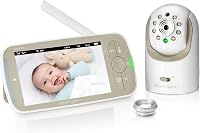
The HelloBaby No WiFi Baby Monitor Camera is the better alternative if you want video without WiFi and a separate 5-inch screen. Compare more HelloBaby baby monitors if you want to consider other models.
It combines camera viewing with two-way audio, night vision and remote positioning.
The camera can pan up to 355 degrees horizontally and tilt up to 120 degrees vertically. A 2X zoom function helps you adjust the view from the parent unit, while the camera rotation is designed to be quiet.
The system includes a 5-inch IPS screen, one baby camera, two power adapters, a user manual and wall-mount screws. The camera needs to be plugged in, while the screen has a stated 30-hour battery life.
The HB6550 also includes room-temperature monitoring and alert, 8 lullabies, a sound-level LED indicator and an audio-only saving mode. It supports tabletop or wall mounting and can expand to up to 4 cameras within the compatible HB6550 range.
One limitation deserves attention. The updated camera is incompatible with the previous HB6550 camera, so contact the seller before trying to match an additional camera with an older system.
Can you view a Nanit baby monitor on a PC?
A PC viewing option can be useful if you work near the nursery or prefer a larger screen, but you should confirm the current viewing method before buying. Smart-monitor access can depend on the manufacturer's supported apps and services.
A computer may be convenient during daytime work, but it doesn't replace a safe nighttime setup. Keep your primary monitoring method easy to access, and avoid leaving a device in a position where its cable can reach the sleep space.
Read Can You View a Nanit Baby Monitor on a PC? for the practical questions to check before relying on computer viewing.
If you want a dedicated screen rather than a computer, the HelloBaby HB6550 offers that format without WiFi. If you only need sound, the VTech avoids screen use altogether.
Can one Nanit setup monitor two babies?
A two-camera arrangement makes sense when both sleep spaces need coverage and you can manage the viewing setup easily. Start by checking the room layout, power access and whether the cameras would need separate mounting positions.
Two babies may need different camera angles or different room arrangements. A floor stand can help when one camera needs a position that a fixed wall mount cannot provide.
Read How to Choose a Nanit Monitor Setup for Two Babies before adding another camera. Plan each view separately instead of assuming one wide angle will cover both sleep spaces.
For a no-WiFi alternative, the HelloBaby system supports up to 4 cameras within the compatible HB6550 range. Confirm camera compatibility before adding units, especially if the existing system is an earlier version.
What should you check before buying the Nanit Pro?
Check mounting, power, viewing and room layout in that order. A camera is only useful when the final setup gives you a clear view and remains practical during everyday care.
First, decide whether the crib position is permanent. If it is, a wall mount may suit the room.
If the crib may move, a floor stand gives you more adjustment but needs a stable location.
Second, plan the cable route. Keep power cables away from the crib and avoid placing a stand where it can be knocked over.
Third, choose your viewing method. If you want phone-based smart monitoring, the Nanit Pro may fit better.
If you want a parent unit, compare the HelloBaby. If you only need sound, compare the VTech.
Finally, check whether you need a handheld screen. Does Nanit Have a Handheld Monitor? covers that question directly.
Nanit Pro baby monitor review: final verdict
The Nanit Pro is the best fit for a smart nursery camera with flexible mounting choices. Pair it with a suitable mount when your room layout matters, and plan the viewing method before buying.
Choose the Didalo Floor Stand for Nanit Pro Baby if you want adjustable height without wall damage. Choose the VTech Audio Baby Monitor if you want simple sound without WiFi.
Choose the HelloBaby No WiFi Baby Monitor Camera if you want video on a dedicated screen.
The right choice is the one that matches your nightly routine. Pick Nanit Pro for smart-camera viewing, VTech for low-complexity audio, or HelloBaby for no-WiFi video with a 5-inch screen.
Frequently asked questions
Is the Nanit Pro baby monitor worth it?
The Nanit Pro makes sense if you want a smart camera and plan to monitor through a phone-based setup. Its mounting choices can suit a fixed nursery or a more flexible arrangement.
Choose a dedicated no-WiFi video monitor if you want a separate parent screen without relying on a phone or home network.
Does the Nanit Pro come with a wall mount?
This review focuses on the Nanit Pro camera and its mounting options, including wall, floor and flex-style arrangements. Check the exact bundle before buying because mounting hardware can vary.
Measure the wall or floor area first, and choose the mount that keeps the camera view clear without creating a cord hazard.
Can you use a Nanit Pro baby monitor while traveling?
You can plan a Nanit Pro travel setup around the mount you can safely pack and install at your destination. A floor or wall arrangement may not suit every room, so confirm the available surface and power access first.
For simpler trips, a no-WiFi monitor with its own screen may involve fewer setup steps.
Does Nanit have a handheld monitor?
The Nanit Pro is designed around a smart camera setup rather than the type of separate handheld parent unit used by traditional monitors. If a dedicated screen is your priority, compare it with a monitor such as the HelloBaby HB6550.
If you mainly need sound, an audio monitor can be simpler.