Eufy E21 Baby Monitor Review: Worth It? (November 2026)
The eufy Baby Monitor E21 is a strong fit for parents who want 4K video, a 5-inch screen and local viewing without Wi-Fi. Its battery-powered camera also suits travel, while the add-on camera and charging base expand the system.
On this page (10 sections)
- What does the eufy Baby Monitor E21 include?
- How good is the E21 camera for daily nursery viewing?
- Is the E21 screen or app better for parents?
- How private is the E21 when Wi-Fi is off?
- Is the E21 suitable for travel?
- What does the E21 add-on camera change?
- Does the E21 need a separate charging base?
- How should you place and use the E21 camera?
- Eufy E21 alternatives and trade-offs
- Final verdict on the eufy baby monitor E21 review
The eufy Baby Monitor E21 is a flexible choice for parents who want 4K UHD camera video, a dedicated 5-inch screen and local monitoring without Wi-Fi. Its 5,000mAh camera battery, app access and privacy switch make it more adaptable than a screen-only monitor.
The main trade-off is that the camera records in 4K UHD while the included monitor displays 720p. The system also has separate options for expansion and charging, so the add-on camera and charging base make sense only for specific setups.
We compared the E21 system, its add-on camera and its charging base by looking at their stated features, connections and intended use. Our score weighs specs, features and buyer feedback against what you're shopping for.
What does the eufy Baby Monitor E21 include?
The complete E21 system includes a baby camera, 5-inch monitor and charging stand, along with camera and monitor power cables, a charging-stand cable, 2 power adapters, a mounting plate, cot mount set, screw pack and quick start guide.
The camera has a 4K UHD image, 330° pan, 60° tilt and 8x zoom. The monitor is a 5-inch 720p display, so the camera's high-resolution feed gives the app and source image more detail than the handheld screen can show.
eufy Baby Monitor E21: Best for flexible home and travel monitoring

- 4K UHD camera
- 5-inch 720p screen
- 5,000mAh camera battery
- 330° pan and 60° tilt
- 8x zoom
- Wi-Fi and local viewing
The complete E21 system combines a 4K UHD camera with a 5-inch 720p monitor, local viewing and app access. It suits parents who want one system for daily nursery use, travel and flexible privacy settings.
Pros
- 4K UHD camera
- Local connection when Wi-Fi is off
- 5,000mAh built-in battery
- 330° pan, 60° tilt and 8x zoom
- Split-screen support for 2 feeds
Cons
- SD card is not included
- The 5-inch screen is 720p rather than 4K
- Camera and monitor have separate power cables
The camera can work with Wi-Fi for app viewing or use a local connection with the Wi-Fi switch turned off. That gives you a practical choice between phone access and a more private direct connection to the monitor.
When the complete E21 system makes sense
Choose the full system if you want both a dedicated screen and phone viewing. The monitor lets you check in without opening your phone, while the app supports remote access and sharing with up to 5 family members.
The camera's 5,000mAh battery is useful when an outlet is not close to the crib. It can also help during travel or a power outage, although you should keep the camera charged and follow the setup instructions before relying on battery power.
How good is the E21 camera for daily nursery viewing?
The E21 camera offers wide movement and close detail, with 330° pan, 60° tilt and 8x zoom. Those controls help you frame a crib or room from a suitable position rather than moving the camera each time your baby shifts.
Night vision uses invisible infrared light, and the camera is designed for indoor use. The camera also supports cry detection, loud-noise detection and room-temperature alerts, with notification settings available through the app.
Active noise reduction is designed to cut background noise by 20 dB. That may make alerts easier to notice around sounds such as a fan, but it does not replace checking on your baby when an alert appears.
The E21 supports 24/7 recording in the app. An SD card is not included with the complete system, so check the storage setup you plan to use before relying on recordings for a longer period.
Is the E21 screen or app better for parents?
The screen is better for quick local checks, while the app is better when you are away from home or want to share access. The E21 combines both, so you don't have to choose one viewing method for every situation.
The 5-inch monitor has a 720p display and connects locally to the camera. This is useful beside a bed or in another room where you want a dedicated screen without opening a phone.
Wi-Fi adds app viewing and allows access sharing with up to 5 family members. The camera's Wi-Fi switch can be turned off when you want the camera to connect only to the monitor.
Parents comparing both viewing methods may also want the best baby monitor system guide. For app access and a separate display, see best baby monitor with app and monitor.
How private is the E21 when Wi-Fi is off?
The E21 offers a local-only mode that turns off the camera's Wi-Fi connection. In that mode, the camera connects to the monitor rather than sending the feed through the app.
The system also uses RSA-1024 and AES-128 encryption. Those security details describe the connection and recording protection, but you should still use a strong router password, update firmware and restrict app access to people you trust.
The E21's local mode is useful for bedtime checks when phone viewing is unnecessary. Wi-Fi mode is more useful when you need access from work, travel or another location.
For a closer comparison of Eufy models and phone access, read which Eufy baby monitors support Wi-Fi and phone viewing. If you want to compare other brands with app and screen options, best Hubble baby monitors is a related place to start.
Is the E21 suitable for travel?
The E21 suits travel because its camera has a 5,000mAh built-in battery and can run without an outlet. The camera can be moved between rooms, taken to a hotel or used during visits to family.
Pack the camera, monitor, cables and power adapters together so the complete system is ready when you arrive. Before leaving, update the camera and monitor firmware through the Eufy Baby app and monitor settings.
Use a stable position with a clear view of the sleep space. If you mount the camera, use the included mounting parts as directed and check that the position remains secure after moving it.
For road trips, a different mounting and power plan may be needed. The guide to the best baby monitor for car covers features that matter when a monitor is used in a vehicle.
What does the E21 add-on camera change?
The E21 add-on camera is best for families who want another room or a second baby feed. It provides the same core camera features as the E21 camera, including 4K UHD video, 330° pan, 60° tilt, 8x zoom and a 5,000mAh built-in battery.
eufy Security Baby Monitor E21 Add-On Camera: Best for adding a second camera
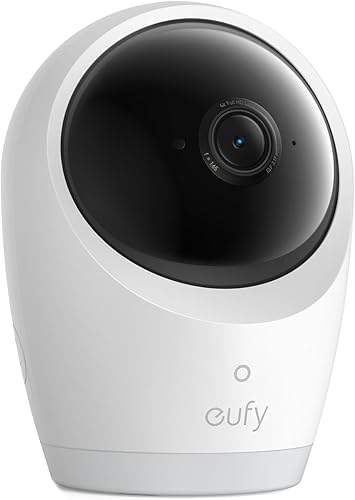
- 4K UHD video
- 330° pan and 60° tilt
- 8x zoom
- 5,000mAh built-in battery
- Split-screen monitoring
- Wall mount
This add-on camera extends an E21 setup for another room or baby. It keeps the same 4K UHD, pan-tilt, zoom and battery features while supporting split-screen monitoring.
Pros
- Matches the E21 camera features
- Split-screen monitoring
- 5,000mAh battery
- Wall-mount option
- Night vision
Cons
- It is an add-on camera rather than a complete monitor system
- The camera's local-only mode connects to the monitor
The E21 system supports 2 feeds on one split screen, which can help when you need to watch 2 spaces from one monitor. The add-on camera is a single camera, not a complete monitor kit, so it makes more sense after you already have the E21 system.
It can use Wi-Fi for app viewing or connect only to the monitor when Wi-Fi is off. The camera also supports a wall-mount setup, giving you another placement option beyond a freestanding position.
Choose the add-on camera when you need coverage in another room or want to monitor twins. Skip it if one camera already covers the space you need and you don't expect to use split-screen viewing.
Does the E21 need a separate charging base?
The separate charging base is useful if you want a fixed docking spot for the E21 monitor. It is compatible with eufy Baby Monitor E20 and E21, uses a Micro USB connector and provides 5V output at 2.4A.
eufy Security Baby Monitor Charging Base: Best for a dedicated E21 monitor dock
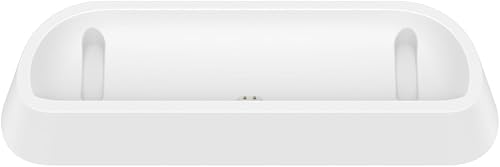
- Compatible with E20 and E21
- Compact base
- Micro USB connector
- 5V output
- Non-slip base
The charging base gives an E20 or E21 monitor a dedicated place to charge on a nightstand, dresser or shelf. It makes the most sense when you want the monitor docked between checks.
Pros
- Designed for E20 and E21
- Compact footprint
- Snug docking design
- Non-slip base
- 5V, 2.4A output
Cons
- It is a charging base only
- Compatibility is limited to E20 and E21 monitors
- North American Type A plug
Its compact design fits on a nightstand, dresser or shelf. The snug docking shape and non-slip base help keep the monitor in place while it charges.
The charging base is an accessory, not another camera or monitor. Choose it when the monitor will live in one main location between checks, and skip it if the included charging stand already works for your room.
Check that your outlet and plug setup match the North American Type A, 2-pin power plug before ordering. Keep the base on a dry, stable surface with the cable arranged so it cannot be pulled.
How should you place and use the E21 camera?
Place the camera where it has a clear view of the sleep space without being within reach. A wall, cot or freestanding setup can work, but the position should stay stable and the cable should not create a hazard.
Use pan, tilt and zoom to frame the area before relying on alerts. A wide room view can show more surroundings, while a closer view may make it easier to see small movements on the monitor.
Check the room-temperature reading against the conditions in the sleep space. The alert can notify you about changes, but it does not replace a suitable room setup or direct care.
At night, confirm that the image is clear and the camera light behavior suits the room. The E21 includes an auto mode that disables the camera light at night.
The best night vision baby monitor guide can help you compare infrared viewing, screen access and placement needs. If you plan to mount a different brand, also see best HelloBaby baby monitor mount for mount-focused advice.
Eufy E21 alternatives and trade-offs
The E21 is strongest when you want one system with a screen, app access, local mode and battery-powered camera. The add-on camera is the natural expansion choice, while the charging base improves the monitor's fixed charging routine.
A screen-only monitor may be simpler if you don't need remote phone viewing. A Wi-Fi-only model may suit you if app access matters more than local monitoring, but it won't offer the same dedicated-monitor setup.
For another connected option, compare VTech Wi-Fi baby monitors.
The E21's 4K camera is useful for detail, pan, tilt and zoom. The included 720p screen means you should judge the system by the whole viewing setup rather than assuming the handheld display shows every 4K detail.
The battery is valuable for travel and flexible placement, but it adds one more charging task. Keep the camera charged before trips, and place the monitor or charging base where you can reach it without disturbing the nursery.
Final verdict on the eufy baby monitor E21 review
The eufy Baby Monitor E21 is the best choice here for flexible monitoring across home, travel and local viewing. Pick the complete system if you want a 5-inch screen, 4K camera, app access, battery power and a privacy switch in one setup.
Pick the E21 add-on camera if you already have the system and need another room or split-screen coverage. Pick the charging base if your E20 or E21 monitor needs a dedicated, compact place to dock.
For this eufy baby monitor E21 review, the decision rule is simple: choose the full E21 for broad use, add the second camera for expanded coverage and buy the charging base only when a fixed monitor dock solves a real daily need.
Frequently asked questions
Is the eufy Baby Monitor E21 worth it?
The eufy Baby Monitor E21 is worth considering if you want 4K UHD camera video, a separate 5-inch 720p screen and local viewing when Wi-Fi is off. Its 5,000mAh camera battery adds travel flexibility, while app access and split-screen support suit families with broader monitoring needs.
Does the eufy Baby Monitor E21 work without Wi-Fi?
Yes, the E21 supports a local connection between the camera and monitor when the camera's Wi-Fi is turned off. Wi-Fi enables app viewing and access sharing, while local mode is useful when you want a direct connection at home without phone viewing.
Can the E21 use a second camera?
The eufy Security Baby Monitor E21 Add-On Camera is designed to extend the E21 system. It adds another 4K UHD camera with 330° pan, 60° tilt, 8x zoom and a 5,000mAh built-in battery, while the E21 supports two feeds on one split screen.
What does the eufy Baby Monitor Charging Base fit?
The eufy Security Baby Monitor Charging Base is compatible with eufy Baby Monitor E20 and E21 monitors. It uses a Micro USB connector and provides 5V output at 2.4A, with a compact design intended for a nightstand, dresser or shelf.


