9 Best Motorola Video Baby Monitors (November 2026)
The best Motorola video baby monitors include the HelloBaby No WiFi Baby Monitor 2 Cameras for two rooms without WiFi, the Motorola Nursery Audio Baby Monitor for simple audio monitoring, and the VTech RM7764-2HD Smart WiFi Baby Monitor for remote HD viewing.
On this page (10 sections)
- How do Motorola video and audio baby monitors compare?
- The best Motorola video baby monitors and close alternatives
- Quick comparison of Motorola video baby monitor choices
- How we compared these baby monitors
- Should you choose a Motorola video baby monitor with WiFi or without WiFi?
- What screen size and camera features should you look for?
- How much range and battery life do you need?
- How should you set up and use a baby monitor safely?
- Which Motorola monitor fits your nursery setup?
- Verdict: which best Motorola video baby monitor should you buy?
The best Motorola video baby monitor for most nurseries in this list is the Motorola Nursery No WiFi Video Baby Monitor VM75 (2026 Model).
It gives you a 5 inch color screen, pan, tilt and zoom, night vision and two-way talk with no WiFi, no app and no account.
If you want a Motorola video baby monitor with two cameras and phone access, the Motorola Nursery WiFi Baby Monitor VM85-2 is the pick to compare.
Our score weighs specs, features and buyer feedback against what you are shopping for.
We compared the picks on screen size, camera count, connection type, range, battery life and daily controls.
Photo above: these terms match the search for a Motorola baby monitor with camera and a video baby monitor from Motorola.
Choose the connection first.
No WiFi models use a direct radio link between camera and parent unit.
WiFi models add an app and remote viewing.
Audio only models do none of that, and they suit parents who mainly need to hear a cry.
If you want the broader picture first, our guide to the best baby monitor system explains how cameras, screens and audio units fit together.
For video only options across brands, see Best Video Baby Monitors.
For screen based choices, our best baby monitor with screen guide helps you judge display size and placement.
Our picks at a glance
-
1
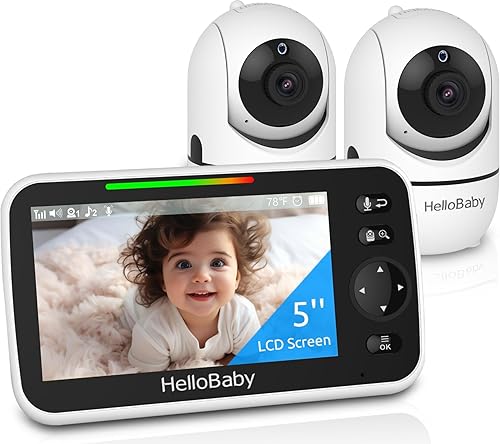 Best for two rooms without WiFi
HelloBaby No WiFi Baby Monitor 2 Cameras
9.6/10 our score
See it on Amazon -
2
 Best for simple audio monitoring
Motorola Nursery Audio Baby Monitor
9.3/10 our score
See it on Amazon -
3
 Best for remote HD viewing
VTech RM7764-2HD Smart WiFi Baby Monitor
9.2/10 our score
See it on Amazon
- 4
 Check it
Momcozy Smart WiFi Baby Monitor with Camera
Best for app sharing and alerts - 5
 Check it
Motorola Nursery Audio Baby Monitor
Best for travel - 6
 Check it
Motorola Nursery Dual Room Audio Baby Monitor
Best for twins or two rooms audio - 7
 Check it
Motorola Nursery Baby Monitor with Camera
Best for a touchscreen parent unit - 8
 Check it
Motorola Nursery No WiFi Video Baby Monitor
Best Motorola pick without WiFi - 9
 Check it
Motorola Nursery WiFi Baby Monitor
Best for two Motorola cameras
How do Motorola video and audio baby monitors compare?
Motorola video monitors in this roundup split into no WiFi and WiFi groups.
The VM75 is no WiFi with one camera.
The VM85-2 has two cameras and can run locally without WiFi or connect through the app.
The VM36XL is WiFi with a touchscreen parent unit and manual pan and tilt.
Motorola audio monitors are simpler.
The AM21 is a single room audio monitor with cry detection.
The PIP12 is a travel audio monitor with a case.
The PIP15 covers two rooms with one parent unit.
None of those three shows video.
That split matters for price, charging and setup.
Audio units are smaller and often run longer on batteries.
Video units need a screen, a camera mount and a clear view of the crib.
Pick the job first, then compare models inside that job.
The best Motorola video baby monitors and close alternatives
The HelloBaby set leads on score because it includes two cameras, a 5 inch screen and no WiFi use.
Motorola picks follow for brand specific needs.
VTech and Momcozy picks fill the gaps for remote HD viewing and app sharing.
HelloBaby No WiFi Baby Monitor 2 Cameras: Best for two rooms without WiFi
- 5 inch IPS screen
- 2 cameras included
- No WiFi 2.4GHz FHSS
- 1000 ft range
- Pan 355 degrees, tilt 120 degrees
- ECO mode up to 30 hours
Two pan and tilt cameras share one large screen with single view switching, which suits twins or a nursery plus another room.
Pros
- Two cameras in the box
- Large 5 inch screen
- No WiFi or app needed
- Long ECO battery life
Cons
- Single view, not split screen
- Extra cameras need care to match the model
This HelloBaby set suits twins, two kids or a nursery plus a second room.
You get two cameras and one 5 inch IPS screen with single view switching, not split screen.
That means a full size view of one room at a time and a quick tap to switch.
The cameras pan 355 degrees, tilt 120 degrees and zoom.
You can check the crib, the floor or a corner without moving the camera by hand.
Auto infrared night vision helps in a dark room.
The 2.4GHz FHSS link needs no WiFi or app.
Battery life runs up to 30 hours in ECO mode.
Sound detection can wake the screen when the baby cries.
Two-way talk, 8 lullabies and room temperature alerts are included.
Range is stated up to 1000 ft outdoors, with the antenna extended.
The trade-off is single view.
You cannot watch both rooms at once in split screen.
If you need two live views side by side, look at the VTech pick below.
The HelloBaby set is for parents who want a large view and simple switching.
Motorola Nursery Audio Baby Monitor: Best for simple audio monitoring
- DECT private connection
- No WiFi
- 1000 ft range
- Cry detection
- Portable parent unit
- Volume control
A simple audio only Motorola monitor with cry detection and a portable parent unit for parents who do not need video.
Pros
- Simple controls
- Long range
- Cry detection alerts
- Portable parent unit
Cons
- No camera or screen
- Uses AAA batteries not included
The Motorola AM21 suits parents who want sound only monitoring with no camera to position.
It uses DECT private connection with no WiFi and a high sensitivity microphone with cry detection.
LED indicators show power, sound detection and out of range.
Range is stated up to 1000 ft.
The parent unit runs on AAA batteries, which are not included.
You can carry it from room to room or place it by your bed.
Volume control sits on the parent unit.
Daily use is simple.
Place the baby unit in the nursery, keep the parent unit near you and adjust volume as needed.
There is no screen to charge, no app to log into and no video feed to check.
The trade-off is clear.
You cannot see if your baby is awake, safe or out of a blanket.
If a visual check matters, the VM75 or VM85-2 videos below fit better.
If sound alerts are enough, the AM21 keeps things simple.
VTech RM7764-2HD Smart WiFi Baby Monitor: Best for remote HD viewing
- 1080p HD camera video
- 7 inch HD parent unit
- 2 cameras
- 360 degree pan and tilt
- 10x zoom
- Free app with no monthly fee
Two smart WiFi cameras with a large 7 inch parent unit and remote app viewing for use at home and away.
Pros
- Large 7 inch parent unit
- Two cameras included
- 1080p camera video
- Remote app viewing
Cons
- Needs WiFi for remote access
- Larger parent unit to carry or charge
The VTech RM7764-2HD suits parents who want remote viewing and a large parent unit at home.
The cameras send 1080p HD video and the 7 inch parent unit shows 720p HD locally.
Two cameras are included for two rooms or two children.
Each camera pans 360 degrees, tilts up and down and zooms up to 10x.
A 110 degree wide angle lens helps cover more of the nursery.
HD night vision switches on automatically in low light.
Motion and temperature alerts can go to your phone.
Remote viewing works through the MyVTech Baby Pro app on iOS and Android.
VTech says there are no fees or monthly subscriptions for that app use.
You can also use the system in direct mode at home without the app.
The trade-off is size and setup.
A 7 inch parent unit is larger to carry, and remote access needs WiFi.
If you want no WiFi at home, the HelloBaby set or Motorola VM75 fits better.
If remote HD viewing matters most, this VTech set is strong.
Momcozy Smart WiFi Baby Monitor with Camera: Best for app sharing and alerts
- 5 inch 1080P display
- WiFi or non WiFi use
- Danger zone alerts
- Motion detection in app
- Share with up to 20 people
- Recording options
A smart monitor that can run with the parent unit at home or through the app, with alerts for motion and leaving a safe area.
Pros
- Choice of WiFi or parent unit
- Danger zone alerts
- Family sharing
- Manual and motion recording
Cons
- Motion alerts appear only in the app
- WiFi pairing needs 2.4GHz networks
The Momcozy BM04 suits parents who want alerts and family sharing.
It has a 5 inch 1080P display and can run through the parent unit at home or through the Momcozy app when you are away.
WiFi pairing supports 2.4GHz networks only.
Danger zone alerts notify you in the app if your baby leaves a set safe area.
Smart motion detection can alert you to movement, including a covered face or face down sleeping.
Motion alerts appear only in the app, so the parent unit alone will not give you those notices.
You can share video access with up to 20 family members.
Recording can be continuous or motion activated, and you can take photos or record manually in the app.
Momcozy gives mounting guidance.
Keep the camera at least 24 inches above the baby and within 16 feet of the crib for wall or floor placement.
The trade-off is app dependence for alerts and sharing.
If you want everything on the parent unit with no app, choose a no WiFi model.
If app alerts and sharing are useful, Momcozy fits a connected nursery.
Motorola Nursery Audio Baby Monitor: Best for travel
- No WiFi needed
- Two-way talk
- 1500 ft range
- Rechargeable battery up to 10 hours
- Water-resistant travel case
- USB-C charging
A compact travel audio monitor with a case, rechargeable batteries and two-way talk for trips and overnight stays.
Pros
- Travel case included
- Rechargeable batteries
- 1500 ft range
- Two-way talk
Cons
- Audio only, no video check
- One channel only
The Motorola PIP12 suits travel, grandparents homes and overnight stays.
It is a compact audio only monitor with no WiFi and a water-resistant travel case.
Two-way talk lets you soothe your baby with your voice from another room.
HD audio and a high sensitivity microphone help you hear cries clearly.
Range is stated up to 1500 ft.
The parent unit alerts you if you move out of range.
Rechargeable batteries give up to 10 hours of use, and USB-C charging makes it easy to power up at home or while traveling.
Packing is simple.
The case holds the monitor for a bag or car trip.
There is no camera to mount and no screen to set up.
That makes it a useful backup when you visit family or use a different sleep space.
The trade-off is audio only use.
You cannot check the room visually, and there is one channel only.
For a fixed nursery, the AM21 or PIP15 may fit better.
For travel and portability, the PIP12 is the clear pick here.
Motorola Nursery Dual Room Audio Baby Monitor: Best for twins or two rooms audio
- 2 room monitors
- 1 parent unit
- No WiFi
- 1500 ft range
- Night light
- Room temperature monitoring
- Up to 8 hours battery life
One parent unit listens to two rooms at once, which helps with twins, siblings, or a nursery and playroom.
Pros
- Two rooms with one parent unit
- Night light included
- Temperature monitoring
- 1500 ft range
Cons
- No video in either room
- Battery life is shorter than some single room picks
The Motorola PIP15 suits twins, siblings or two sleep spaces with one parent unit.
It includes 2 room monitors and 1 portable parent unit with no WiFi needed.
You can listen to both rooms and talk back to either room.
HD audio and two-way talk help you respond without entering the room.
Range is stated up to 1500 ft.
The parent unit gives visual alerts if you move out of range.
Extra features include room temperature monitoring and a built-in night light.
Battery life is stated up to 8 hours in the bullets and 9 hours in the specs, so charge it daily if you use it overnight.
USB-C power adapters are included in the box list.
The monitors run on AAA batteries.
The trade-off is no video.
You can hear crying and talk back, but you cannot see the room.
If you need a visual check in two rooms, a two camera video set fits better.
If audio for two rooms is enough, the PIP15 saves space on your nightstand.
Motorola Nursery Baby Monitor with Camera: Best for a touchscreen parent unit
- 5 inch color screen
- HD 720p video
- Manual pan, tilt and digital zoom
- WiFi app connection
- Two-way talk
- Lullabies
- Room temperature sensor
A WiFi video monitor with a touchscreen parent unit, manual pan and tilt, lullabies and app access.
Pros
- Touchscreen parent unit
- App access for iOS and Android
- Two-way talk
- Lullabies included
Cons
- Manual pan and tilt, not motorized
- One camera only
The Motorola VM36XL suits parents who like a touchscreen parent unit and app access.
It has a 5 inch color touchscreen with HD 720p video over WiFi.
The camera has manual pan, tilt and digital zoom.
The Motorola Nursery App works with Apple iOS and Android.
You can use two-way talk, lullaby selection and a room temperature sensor through the app.
Motorola states triple layer security protection with AES 128-bit, AES 256-bit and a proprietary 512-bit layer.
A flashlight sits on the back of the remote.
The high sensitivity microphone can alert you when your baby starts crying.
Built-in lullabies play through the camera speaker.
Night vision is listed as night color in the specs.
The trade-off is manual movement.
You must adjust pan and tilt by hand on the camera, not from the parent unit.
There is one camera only.
If motorized movement or two cameras matter, the VM75 or VM85-2 fits better.
If a touchscreen and app controls matter, the VM36XL is worth a look.
Motorola Nursery No WiFi Video Baby Monitor: Best Motorola pick without WiFi
- 5 inch color screen
- Pan, tilt and zoom
- Night vision
- 2-way talk
- 1000 ft range
- Temperature sensor
- Lullabies
- No WiFi 2.4GHz FHSS
The 2026 VM75 gives Motorola video monitoring with a 5 inch screen, pan, tilt and zoom, and no app or account.
Pros
- No WiFi, app or account
- Pan, tilt and zoom
- Temperature alerts
- Lullabies and two-way talk
Cons
- Sound alerts only, no motion detection
- One camera included
The Motorola VM75 suits parents who want Motorola video monitoring with no WiFi, no app and no account.
It uses a closed 2.4GHz FHSS signal between camera and parent unit.
The 5 inch color screen shows real time video with infrared night vision.
You can pan, tilt and zoom the camera from the parent unit.
That helps you check the crib, the floor or a corner without walking into the room.
Digital zoom lets you look at details.
Two-way talk and built-in lullabies help you soothe your baby.
Room temperature alerts let you know when the nursery gets too warm or cool.
Alerts are sound activated with VOX.
This model does not include motion detection.
Range is stated up to 1000 ft, and battery life is designed for overnight monitoring.
The trade-off is one camera and no motion alerts.
If you need two rooms, choose the VM85-2.
If you want motion alerts in an app, choose a WiFi model.
If privacy and simple setup matter most, the VM75 is the Motorola pick to start with.
Motorola Nursery WiFi Baby Monitor: Best for two Motorola cameras
- 2 cameras included
- 5 inch color screen
- Pan, tilt and zoom
- Use with or without WiFi
- Night vision
- Temperature alerts
- Two-way talk
- 1000 ft range
Two cameras managed from one 5 inch screen or the app, with local FHSS use at home and remote access when you add WiFi.
Pros
- Two cameras included
- Works without WiFi at home
- App access when away
- Pan, tilt and zoom on both cameras
Cons
- Needs WiFi for remote viewing
- Corded power for the system
The Motorola VM85-2 suits parents who want two cameras with one 5 inch screen and optional phone access.
Both cameras are included in the box.
You can place them in separate rooms, point them at twins or cover two angles of one nursery.
At home, the system can run over a secure FHSS connection with no WiFi required.
When you need remote access, connect through the Motorola Bebé app for live video from anywhere.
Motorola states encrypted FHSS at home and encrypted WiFi streaming for app use.
Each camera has remote pan, tilt and zoom from the parent unit or app.
Automatic infrared night vision keeps the picture clear in the dark.
You get sound and motion alerts, temperature monitoring and two-way talk.
Lullabies can soothe your baby from another room or from the app.
The trade-off is power and WiFi setup.
The system is corded electric, and remote viewing needs WiFi.
If you want battery powered portability or no WiFi at all, the VM75 or HelloBaby set fits better.
If two Motorola cameras matter, the VM85-2 is the choice.
Quick comparison of Motorola video baby monitor choices
| Product | Best for | Screen | Cameras | Range | Our score |
|---|---|---|---|---|---|
| HelloBaby No WiFi Baby Monitor 2 Cameras | two rooms without WiFi | 5 inch IPS | 2 included | 1000 ft | 9.6 |
| Motorola Nursery Audio Baby Monitor | simple audio monitoring | 1000 ft | 9.3 | ||
| VTech RM7764-2HD Smart WiFi Baby Monitor | remote HD viewing | 2 included | 9.2 | ||
| Momcozy Smart WiFi Baby Monitor with Camera | app sharing and alerts | 9.0 | |||
| Motorola Nursery Audio Baby Monitor | travel | 1500 ft | 8.9 | ||
| Motorola Nursery Dual Room Audio Baby Monitor | twins or two rooms audio | 1500 ft | 8.6 | ||
| Motorola Nursery Baby Monitor with Camera | a touchscreen parent unit | 5 inch color touchscreen | 8.4 | ||
| Motorola Nursery No WiFi Video Baby Monitor | Motorola pick without WiFi | 5 inch color | 1000 ft | 8.1 | |
| Motorola Nursery WiFi Baby Monitor | two Motorola cameras | 5 inch color | 2 included | 1000 ft | 7.9 |
The table shows the main split in this roundup.
Video models give you a screen and a visual check.
Audio models give you sound, talk back and longer portability.
No WiFi models keep the link inside your home.
WiFi models add phone access.
Use the table to narrow by rooms first.
One room picks are the AM21, PIP12, VM36XL and VM75.
Two room picks are the PIP15, VM85-2, HelloBaby set and VTech set.
The Momcozy pick adds app alerts for a single camera setup.
Then narrow by connection.
If your router drops or you worry about hacking, no WiFi models remove that risk at home.
If you want to check in from work or a doctors visit, WiFi models add that access.
Some models, such as the VM85-2 and Momcozy, try to do both.
How we compared these baby monitors
We compared specs, features and buyer feedback against what a Motorola video baby monitor searcher wants.
That means screen size, camera count, pan and tilt, night vision, range, battery life and connection type mattered most.
We also weighed ease of setup and daily controls.
We did not test these monitors ourselves.
We checked the product data for each model and compared claims such as range, battery life and zoom.
Range and battery claims use different test settings, so we treated them as guides rather than promises.
Prices, star ratings and review counts are not used here.
Scores in this roundup reflect how well each model fits the search, not a price or a single review.
A high score can still mean a trade-off, and each write-up names that trade-off.
Should you choose a Motorola video baby monitor with WiFi or without WiFi?
A WiFi Motorola video baby monitor is better if you want phone viewing away from home.
The VM36XL and VM85-2 both connect to an app.
The VM85-2 can also run locally without WiFi, which gives you a home link if your router fails.
A no WiFi Motorola video baby monitor is better if privacy and simple setup matter most.
The VM75 uses FHSS with no app, no account and no cloud.
There is no login to manage and no video feed sent over your home network.
When WiFi helps
WiFi helps for remote check ins, app alerts and sharing with family.
It also helps if you want to view the nursery from another part of town.
Check that your router uses 2.4GHz if the model requires it, and confirm phone compatibility before you buy.
When no WiFi helps
No WiFi helps during outages and in homes with many connected devices.
It also helps in nurseries where you do not want an app account.
The direct link is limited to the parent unit, so you cannot watch from your phone unless the model supports a separate WiFi mode.
What screen size and camera features should you look for?
A 5 inch screen is a practical size for most nightstands.
It shows the crib clearly without taking up much space.
A 7 inch parent unit, such as the VTech set, shows more detail but is harder to carry from room to room.
Pan, tilt and zoom change daily use.
Motorized pan and tilt let you move the view from the parent unit.
Manual pan and tilt, such as on the VM36XL, need a hand on the camera.
Digital zoom can help you check a face, but it does not add detail like optical zoom.
Camera count
One camera suits one nursery.
Two cameras suit twins, two rooms or two sleep spaces.
Check whether the system switches between views or shows both at once.
Single view switching gives a larger picture.
Split screen shows both rooms but each view is smaller.
Night vision and alerts
Infrared night vision helps you see in a dark nursery.
Temperature alerts help you spot a room that is too warm or cool.
Sound alerts wake the screen when your baby cries.
Motion alerts are useful, but some models only send them through an app.
How much range and battery life do you need?
Range needs depend on your home layout.
A 1000 ft claim gives headroom for most houses, and a 1500 ft claim adds more.
Indoor walls reduce range, so test the out of range alert in the rooms you use most.
Our best long range baby monitor guide explains how to check that link.
Battery life matters for the parent unit.
ECO mode can extend use by turning the screen off until sound is detected.
Rechargeable batteries are easier than buying AAA batteries.
If your parent unit runs on AAA batteries, keep spares by your bed.
For battery care tips, see our motorola baby monitor battery replacement guide.
Charge the parent unit before the first night.
Plug it in overnight if you plan to use sound alerts all night.
A dead parent unit helps no one.
How should you set up and use a baby monitor safely?
Place the camera above and to the side of the crib.
Keep it at least 24 inches from your baby if the maker gives a minimum height.
Fix the camera so it cannot fall into the crib.
Keep cords out of reach and away from the sleep area.
Check the view in daylight and at night.
Make sure the crib fills enough of the frame and that blankets, pillows or toys do not block your view.
Test two-way talk so your voice is clear but not too loud.
Test the out of range alert from the farthest room you use.
Clean the camera lens with a soft dry cloth.
Keep the parent unit away from water unless the maker states water resistance.
Store extra batteries in a cool dry place.
If a monitor stops working, replace batteries or charge it before you rely on it again.
Which Motorola monitor fits your nursery setup?
Pick the Motorola Nursery No WiFi Video Baby Monitor VM75 if you want one camera, a 5 inch screen and no WiFi.
Pick the Motorola Nursery WiFi Baby Monitor VM85-2 if you want two cameras and phone access.
Pick the Motorola Nursery Baby Monitor with Camera VM36XL if a touchscreen parent unit matters more than motorized movement.
Pick the Motorola Nursery Audio Baby Monitor AM21 if sound only is enough.
Pick the Motorola Nursery Audio Baby Monitor PIP12 for travel.
Pick the Motorola Nursery Dual Room Audio Baby Monitor PIP15 for two rooms with one parent unit.
If you want a non Motorola option, pick the HelloBaby set for two no WiFi cameras and one large screen.
Pick the VTech set for a 7 inch parent unit and remote HD viewing.
Pick the Momcozy monitor for app alerts, danger zone alerts and family sharing.
Verdict: which best Motorola video baby monitor should you buy?
The best Motorola video baby monitor for most parents here is the VM75 for no WiFi video, a 5 inch screen and pan, tilt and zoom.
The VM85-2 is the better Motorola choice for two cameras and phone access.
The VM36XL suits touchscreen fans who do not mind manual camera movement.
For audio only Motorola buyers, the AM21 is the simple home pick, the PIP12 is the travel pick and the PIP15 is the two room pick.
For the highest scoring set overall, the HelloBaby two camera system leads on camera count, screen size and no WiFi use.
Start with your rooms, then your connection.
One room and no WiFi points to the VM75.
Two rooms and no WiFi points to HelloBaby or the PIP15 for audio.
Remote viewing points to VM85-2, VTech or Momcozy.
Use that order as your decision rule.
Next, check our best baby monitor with screen guide to compare display sizes before you choose.
If range is your main worry, read our long range guide and test the alert in your home.
Our top 3 picks at a glance
-
1
Best for two rooms without WiFi
HelloBaby No WiFi Baby Monitor 2 Cameras
9.6/10 our score
See it on Amazon -
2
Best for simple audio monitoring
Motorola Nursery Audio Baby Monitor
9.3/10 our score
See it on Amazon -
3
Best for remote HD viewing
VTech RM7764-2HD Smart WiFi Baby Monitor
9.2/10 our score
See it on Amazon
Frequently asked questions
Is a Motorola video baby monitor better with WiFi or without WiFi?
It depends on where you want to watch. A no WiFi model links the camera and parent unit directly and keeps working if your router fails.
A WiFi model adds phone viewing when you are away.
Many parents choose no WiFi for the nursery and keep a second simple option for travel.
Do Motorola audio monitors show video?
No. Models such as the AM21, PIP12 and PIP15 are audio only.
They are built to hear crying, talk back and alert you to sound.
Choose a video model such as the VM75 or VM85-2 if you want to see the room, check a sleep position or use pan and tilt.
What range do you need for a baby monitor?
Range claims are usually tested outdoors in open conditions. Indoor walls, floors and metal objects reduce the usable distance.
A 1000 ft or 1500 ft claim gives headroom for most houses, but walk your home and check the out of range alert before the first night.
Can one parent unit cover two rooms?
Yes, if the system includes two cameras or two audio monitors. The HelloBaby set switches between two cameras on one screen in single view.
The Motorola PIP15 uses one parent unit with two audio monitors.
The VM85-2 includes two video cameras.
How should you place a baby monitor camera?
Place the camera above and to the side of the crib, not inside it. Keep cords out of reach and fix the camera so it cannot fall.
Check the view at night, confirm the angle covers the sleep area, and keep the parent unit charged or plugged in overnight.


