9 Best Baby Monitors with Large Screens (November 2026)
The best baby monitors with large screens include the VTech Smart WiFi Baby Monitor for home and away viewing, the HelloBaby No WiFi Baby Monitor Camera for simple no-WiFi use, and the HelloBaby 6" IPS Large Screen Baby Monitor for a larger single-room view.
On this page (9 sections)
- Best baby monitors with large screens for each nursery setup
- Large screen baby monitor picks compared
- How we compared these large screen baby monitors
- What screen size should you choose for a baby monitor?
- Do you need WiFi or a no-WiFi baby monitor?
- How many cameras do you need on a large screen monitor?
- What battery life should you expect from a large screen monitor?
- What features matter most besides screen size?
- Verdict: which large screen baby monitor should you buy?
The best baby monitor large screen for most homes is the VTech Smart WiFi Baby Monitor VM901, because its 5-inch HD screen handles night checks without a phone and its app handles checks away from home.
A larger display helps you read movement and facial detail faster, especially in low light.
Screen size matters most when you sit farther from the parent unit or watch two rooms side by side.
Our score weighs specs, features and buyer feedback against what you're shopping for.
We compared screen size, camera count, battery life, pan and tilt range, night vision, connectivity and two-way talk across these nine sets.
If you want a broader starting point, our best baby monitor system guide explains how cameras, screens and apps work together.
For camera-first shopping, our best baby monitor with camera roundup focuses on video quality and coverage.
Our picks at a glance
-
1

-
2

-
3
 Best for a larger single-room view
HelloBaby 6" IPS Large Screen Baby Monitor
9.2/10 our score
See it on Amazon
- 4
 Check it
Babysense PRO Full HD 5.5" Split Screen
Best for two rooms on one screen - 5
 Best for no-WiFi pan and tilt valueCheck it
- 6
 Check it
Blemil 6" Split Screen Video Baby Monitor
Best for two cameras on a 6-inch screen - 7
 Check it
jeeber 1080P WiFi Baby Monitor With Camera
Best for a compact WiFi screen and app - 8
 Best for two rooms with app sharingCheck it
- 9
 Check it
Comfyer BM01 7" Split-Screen Baby Monitor
Best for the largest split-screen view
Best baby monitors with large screens for each nursery setup
Each pick below solves a different viewing problem, from one room on a 6-inch IPS panel to two rooms on a 7-inch split screen.
Match the display and camera count to the rooms you watch before you compare extra features.
VTech Smart WiFi Baby Monitor: Best for home and away viewing
- 5-inch HD parent screen
- 1080p camera with automatic night vision
- Pan, tilt and zoom control
- Free app with multi-user access
A 5-inch parent screen covers overnight checks at home while the free app covers use away from home.
Pros
- Dedicated screen so you do not need a phone at night
- 1080p camera with automatic night vision
- Pan, tilt and zoom from screen or app
Cons
- WiFi connection needed for remote app viewing
- Single camera in this set
The VTech VM901 suits parents who want one system for the nursery and for time away from home.
Its 5-inch HD parent screen sits on a nightstand and keeps night checks off your phone, while the free MyVTech Baby app gives a live view from anywhere with a signal.
The 1080p camera shows true color detail during the day and switches to crisp night vision automatically when the room gets dark.
That automatic switch means you can see clear detail at 3am without touching a setting, and the infrared night vision helps you judge sleep without a bright glow.
Pan, tilt and zoom controls on the parent unit or the app let you follow your baby across the nursery and zoom in without opening the door.
Two-way talk lets you speak through the camera to settle your baby from the kitchen or an office.
Phone and parent unit alerts cover stirring, motion and a room that gets too warm or too cool.
You can share app access with a partner, grandparent or babysitter for shared caregiving.
The trade-off is WiFi for remote viewing and a single camera in this set.
HelloBaby No WiFi Baby Monitor Camera: Best for simple no-WiFi use
- 5-inch color display
- 355-degree horizontal and 120-degree vertical rotation
- 2.4GHz FHSS private connection
- 30-hour battery average life
A no-WiFi 5-inch screen with pan and tilt suits parents who want a private in-home connection and long battery use.
Pros
- No WiFi or app needed
- Wide pan and tilt range
- Long battery life
Cons
- No remote viewing away from home
- Camera updates can affect older camera compatibility
The HelloBaby HB6550 suits parents who want a private in-home monitor without WiFi or an app.
Its 5-inch color display gives a clear view for one room, and remote rotation covers 355 degrees horizontally and 120 degrees vertically.
That wide movement helps you check behind a crib or across a larger nursery without moving the camera by hand.
The 2X zoom helps when your baby shifts to a far corner of the room, and noiseless rotation helps keep the room calm.
Infrared night vision gives a clear dark-room view, and the invisible infrared LED design avoids disrupting your baby at night.
Two-way audio lets you speak and listen from another room as if you were in the same room.
Room temperature monitoring and a sound level LED indicator add comfort checks at a glance.
Eight lullabies, an audio-only saving power mode and date and time on the screen cover daily extras.
The 2.4GHz FHSS link with digital encryption needs no WiFi, and the set supports up to four cameras for multi-room use.
Battery average life is listed at 30 hours for the parent unit.
The main trade-off is no away-from-home viewing and no app access.
HelloBaby 6" IPS Large Screen Baby Monitor: Best for a larger single-room view
- 6-inch IPS screen
- 4000mAh battery
- 318-degree pan, 120-degree tilt and 2X zoom
- No WiFi 2.4GHz FHSS connection
The 6-inch IPS display gives more room for detail than a 5-inch screen while keeping a no-WiFi setup.
Pros
- Larger IPS screen with wide viewing angle
- Strong battery capacity
- Pan, tilt and zoom control
Cons
- Single-room focus
- No app viewing away from home
The HelloBaby 6-inch IPS model suits parents who want more display space for a single nursery.
Its 6-inch IPS screen offers high color accuracy, a wider viewing angle and vivid visuals, which helps when you view it from an angle on a dresser or shelf.
That extra panel size makes small movements easier to read than on a 5-inch display.
The 4000mAh battery supports longer use without frequent charging, and ECO mode helps stretch time between charges.
Night vision uses infrared for complete darkness, so you can monitor even when lights are off.
Pan, tilt and zoom cover 318 degrees, 120 degrees and 2X zoom, so you can adjust the view to your baby's position remotely.
Two-way talk lets you comfort your baby with your voice from elsewhere in the home.
Temperature monitoring helps you judge comfort without walking in to check.
The 2.4GHz FHSS connection needs no internet, which keeps setup direct and private.
The trade-off is a single-room focus with no app viewing away from home.
Babysense PRO Full HD 5.5" Split Screen: Best for two rooms on one screen
- 5.5-inch Full HD split screen
- Two cameras included
- Expandable to four cameras
- 20-hour battery in Eco Mode
A 5.5-inch split screen shows two rooms at once without switching views, which helps parents of siblings.
Pros
- Two cameras in the box
- Split screen shows two views at once
- Expandable to four cameras
Cons
- No remote app viewing
- Each camera needs a power outlet
The Babysense PRO suits parents who watch two rooms or two children at the same time.
Its 5.5-inch split-screen display shows both camera views together in Full HD, so you do not need to switch screens between rooms.
Two Full HD pan and tilt cameras come in the box, and the set expands to four cameras as your family grows.
That matters for twins, siblings in separate rooms or a nursery plus a toddler room.
The private FHSS non-WiFi connection needs no router or app, which keeps viewing inside the home and limits remote access.
Battery life reaches up to 20 hours in Eco Mode, with shorter time in continuous viewing.
A 6-color night light and an integrated sound and light machine with white noise help create a calming sleep environment.
Remote pan, tilt and zoom control from the monitor lets you adjust each camera without entering either room.
Cameras are corded electric while the parent unit is rechargeable, so plug placement needs planning.
The trade-off is in-home only viewing with no app for away checks.
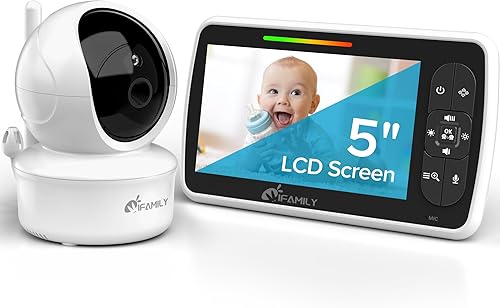
iFamily Baby Monitor: Best for no-WiFi pan and tilt value
- 5-inch screen
- 30-hour battery life
- Remote pan, tilt and zoom
- No WiFi 2.4GHz FHSS connection
A 5-inch no-WiFi monitor with pan, tilt, zoom and a 30-hour battery suits straightforward nursery watching.
Pros
- No WiFi or app needed
- Pan, tilt and zoom controls
- Long battery life
Cons
- No remote viewing away from home
- Single camera in this set
The iFamily monitor suits parents who want a simple large screen without WiFi.
Its 5-inch display gives a comfortable view for one room and pairs with pan, tilt and zoom controls on the parent unit.
You can pan the room, tilt the camera and zoom in on your baby to view open space in a nursery or child bedroom.
The 30-hour battery life helps with long nights and naps without daily charging.
Invisible high-powered infrared LED night vision illuminates your baby's face without interrupting sleep.
That no red glare design helps keep a dark room dark while still giving a distinct view.
Two-way audio, a room temperature display and instant-play lullabies cover the basics parents use most.
The no-WiFi 2.4GHz FHSS link needs no account or app, so setup stays direct and private.
Voice activation and eco mode can wake the screen when your baby makes noise and save battery between checks.
The set supports up to four cameras, and you can use wall mount or tabletop placement.
The trade-off is single-camera coverage in this set with no away-from-home access.
Blemil 6" Split Screen Video Baby Monitor: Best for two cameras on a 6-inch screen
- 6-inch IPS split screen
- Two cameras included
- 4000mAh battery
- No WiFi 2.4GHz FHSS connection
Two cameras share one 6-inch IPS screen, so you can keep two rooms in view without swapping screens.
Pros
- Two cameras included
- Large 6-inch IPS display
- Strong battery with ECO mode
Cons
- No remote app viewing
- Video battery life is shorter than audio-only ECO use
The Blemil set suits parents who want two cameras on a bigger shared display.
Its 6-inch IPS screen shows two views in split screen with vivid colors and a wide viewing angle.
The IPS panel gives smooth and clear images with low distortion, so you can see the whole room rather than a cropped view.
Both cameras pan 310 degrees horizontally and tilt 120 degrees vertically, so you can adjust each room view from the parent unit.
Zoom and two-way communication are also controlled from the parent unit interface.
Night vision switches to black and white automatically in the dark for overnight checks.
The 4000mAh battery gives long standby time, with about 30 hours in ECO mode and about 16 hours in regular mode.
ECO mode lets the screen sleep to save power and wakes when your baby cries.
Cry detection monitors for crying in real time, and the system can emit sound from one camera while alerting the other.
The 2.4GHz FHSS link needs no WiFi or app and reaches up to 1000 feet in ideal conditions.
The trade-off is no remote app viewing, and each split view is smaller than a full-screen 6-inch image.
jeeber 1080P WiFi Baby Monitor With Camera: Best for a compact WiFi screen and app
- 4-inch IPS screen
- 1080P WiFi camera
- 360-degree pan and tilt
- 14-hour battery life
A smaller 4-inch screen pairs with app viewing, which suits parents who mainly check from a phone.
Pros
- Screen and app viewing
- 360-degree pan and tilt
- Motion and cry alerts
Cons
- Smallest screen in this group
- No stand included for the camera
The jeeber monitor suits parents who want a compact WiFi set with both a screen and an app.
Its 4-inch IPS display is the smallest here, but phone viewing can cover many checks during the day.
You can monitor via the 4-inch display or your phone app at the same time on a 2.4GHz WiFi connection.
The 360-degree pan and tilt camera gives full room coverage from one mounting point.
Auto infrared night vision switches when light fades, with a no-glow design for nighttime checks.
The 68-degree wide lens helps capture the entire crib without blind spots, and video is 720P with support up to 1080P display.
Cry detection and motion alerts send real-time alerts to your phone.
Two-way talk, preset lullabies and a feeding reminder help you soothe without entering the nursery.
Room temperature monitoring adds a safety check for nursery comfort.
The 14-hour battery supports daytime carrying from room to room, while the base unit requires power.
The trade-off is screen size and no stand included for the camera.
VTech Smart WiFi Baby Monitor: Best for two rooms with app sharing
- Two cameras included
- 5-inch split screen
- 1080p cameras
- Free app with shared access
Two 1080p pan-tilt-zoom cameras share one 5-inch split screen and the free app for watching both rooms.
Pros
- Two cameras in one set
- Split screen on the parent unit
- Shared app access for caregivers
Cons
- Smaller shared screen than 6-inch or 7-inch picks
- WiFi needed for remote viewing
The VTech VM901-2HD suits parents of twins or siblings who need two rooms on one system.
Its 5-inch split screen shows both cameras side by side, and a tap moves either view to full screen.
Both 1080p cameras switch to night vision on their own when a room gets dark, without manual adjusting.
Pan, tilt and zoom work independently for each camera, with zoom up to 10X from the app and up to 8X from the parent unit.
You can follow a baby rolling in one room while keeping the other room in view.
The free MyVTech Baby Plus app shows both rooms from anywhere, and shared access lets a partner, babysitter or grandparent check in from their own phone.
Alerts cover sound, motion and temperature for either room, so nothing slips past when you are out.
Two-way talk through either camera can settle one child without waking the other.
The set includes two wall-mount brackets, anchors and screws, plus three AC adapters for the cameras and parent unit.
The trade-off is a smaller shared display than the 6-inch and 7-inch split-screen picks.
Comfyer BM01 7" Split-Screen Baby Monitor: Best for the largest split-screen view
- 7-inch split screen
- Two 1080P cameras included
- 6000mAh battery
- No WiFi 2.4GHz FHSS connection
The 7-inch screen is the largest here and shows two camera views side by side for twins or siblings.
Pros
- Largest screen in this group
- Two cameras included
- Strong battery capacity
Cons
- No app or remote viewing
- Larger display can reduce battery life in continuous video use
The Comfyer BM01 suits parents who want the largest display in this group.
Its 7-inch screen shows two camera views side by side, which helps when you watch twins or two rooms at once.
The panel is a 7-inch 720P HD color display, while the two included cameras are 1080P.
You can use 2 or 4 split-screen viewing, and you can connect up to four cameras over time.
Each camera pans 355 degrees and tilts 120 degrees, with 2X and 4X zoom for closer detail.
Noiseless camera rotation helps maintain a peaceful environment during overnight checks.
The 6000mAh battery supports up to 13 hours of continuous video or 2 days of audio-only VOX mode.
VOX mode keeps monitoring in the background with the screen off and wakes the screen on sound above your preset level.
Night vision gives clear viewing in dim light, and two-way audio lets you soothe from another room.
A flexible goose-neck mount can wrap a crib, bed or shelf without drilling, and wall mount screws are also included.
Temperature sensor alerts, five lullabies and three ambient sounds add comfort tools.
The trade-off is no WiFi or app, so viewing stays inside the home.
Large screen baby monitor picks compared
The biggest screen here is the Comfyer at 7 inches, while the Blemil and HelloBaby 6-inch models sit in the middle.
Screen size alone does not decide the best fit, since camera count and WiFi use change how you watch each room.
| Product | Best for | Screen size | Video resolution | Connectivity | Our score |
|---|---|---|---|---|---|
| VTech Smart WiFi Baby Monitor | home and away viewing | 5 inches | 1080p | WiFi and 2.4G FHSS | 9.5 |
| HelloBaby No WiFi Baby Monitor Camera | simple no-WiFi use | 5 inches | No WiFi 2.4GHz FHSS | 9.5 | |
| HelloBaby 6" IPS Large Screen Baby Monitor | a larger single-room view | 6 inches | No WiFi | 9.2 | |
| Babysense PRO Full HD 5.5" Split Screen | two rooms on one screen | 5.5 inches | No WiFi FHSS | 9.2 | |
| iFamily Baby Monitor | no-WiFi pan and tilt value | 5 inches | No WiFi | 9.1 | |
| Blemil 6" Split Screen Video Baby Monitor | two cameras on a 6-inch screen | 6 inches | 9.1 | ||
| jeeber 1080P WiFi Baby Monitor With Camera | a compact WiFi screen and app | 4 inches | WiFi 2.4GHz | 8.8 | |
| VTech Smart WiFi Baby Monitor | two rooms with app sharing | 5 inches | 1080p | 8.6 | |
| Comfyer BM01 7" Split-Screen Baby Monitor | the largest split-screen view | 7 inches | 8.4 |
For one room, a 5-inch or 6-inch full-screen view gives the clearest single image.
For two rooms, split screen puts two smaller images on one panel, so a 6-inch or 7-inch display helps more than it does with one camera.
Our best baby monitor with screen guide breaks down parent-unit viewing in more detail.
If two-way talk is a must-have feature, our best baby monitor two way talk roundup narrows the field.
How split screen changes each view
In split screen, the full panel is divided between cameras.
A 5-inch split screen therefore gives each room far less space than a 5-inch single view.
That is why the 6-inch Blemil and 7-inch Comfyer have an advantage for two rooms.
How we compared these large screen baby monitors
We checked screen size, camera count, video resolution, night vision, battery capacity and stated battery life for every set.
We also compared pan and tilt range, zoom, temperature monitoring, lullabies and two-way talk.
Connectivity got close attention because it changes daily use.
WiFi sets add phone viewing away from home, while no-WiFi FHSS sets keep the link private and inside the home.
Scores reflect how well each set fits a large screen search.
We did not test these monitors.
Claims about battery life, range and privacy come from each brand, and real results can vary by room layout, walls and settings.
Range figures often assume open space.
Indoor range can fall when walls, floors, metal objects or other electronics sit between the camera and the parent unit.
What screen size should you choose for a baby monitor?
A 5-inch screen fits most single-room use and stays easy to carry from room to room.
It works well on a nightstand, dresser or kitchen counter where you check the feed at close range.
A 6-inch screen gives more detail for one room and more usable space for two split views.
It suits parents who watch from farther away or who want to read small movements without zooming.
A 7-inch screen helps most with split-screen viewing.
Each half of the panel still measures less than the full display, so the extra inches matter when you watch two rooms at once.
When a bigger screen does not help
A larger display will not fix a poor camera angle or a weak signal.
Place the camera high enough to see the crib, and keep the parent unit where you can view it without glare.
Battery life also drops when the screen stays on all night.
ECO or VOX mode helps if your routines allow sound-only watching between checks.
Do you need WiFi or a no-WiFi baby monitor?
WiFi monitors let you check the feed from your phone when you leave the nursery or the house.
The VTech VM901 and VM901-2HD use this approach, and the jeeber set pairs a small screen with app viewing.
No-WiFi monitors use a direct FHSS link between the camera and the parent screen.
HelloBaby, Babysense, iFamily, Blemil and Comfyer use this setup, with no app or home internet needed for viewing.
Choose WiFi if away-from-home checks matter.
Choose no-WiFi if you want a simpler connection and fewer accounts to manage.
If a screen goes dark during use, our guide to a hello baby monitor black screen covers common checks before you assume the camera has failed.
How privacy and connection type compare
WiFi viewing sends video over your home network to an app.
Use a strong password and keep the app updated if you choose a WiFi set.
No-WiFi FHSS sets keep the feed on a private link between the camera and screen.
That limits remote access, which some parents prefer for privacy.
How many cameras do you need on a large screen monitor?
One camera fits one nursery and gives you the full screen for that room.
Pan, tilt and zoom help you follow your baby without buying a second camera.
Two cameras fit twins, siblings or a nursery plus another room.
Split-screen models show both views at once, while single-view models require switching between cameras.
Expandable sets let you add cameras later.
Babysense expands to four cameras, and Comfyer connects up to four cameras, which helps as routines change.
A best Motorola video baby monitor guide is worth a look if you want to compare another brand's camera sets before you decide.
Which rooms should each camera cover?
Put the first camera where your baby sleeps most.
Add a second camera for a sibling room, a play area or a caregiver's room.
Check audio before you buy.
Some split-screen sets keep sound on one camera, so you may hear only the room you selected.
What battery life should you expect from a large screen monitor?
Battery life depends on screen brightness, continuous video use and ECO or VOX settings.
Stated hours usually assume lighter use than an all-night screen-on routine.
The iFamily set states 30 hours of battery life, and HelloBaby states a 30-hour battery average life.
Babysense states up to 20 hours in Eco Mode with a 5.5-inch split screen.
Comfyer states up to 13 hours of continuous video or 2 days of audio-only VOX mode.
Blemil states about 30 hours in ECO mode with its 4000mAh battery.
How to stretch battery life at night
Lower screen brightness when you can.
Use ECO or VOX mode if sound alerts are enough between checks.
Charge the parent unit during naps when possible.
What features matter most besides screen size?
Night vision matters for overnight checks.
Look for automatic switching so the camera adjusts when lights go out without a manual change.
Pan, tilt and zoom help you follow a rolling or crawling baby.
Two-way talk lets you soothe from another room, and temperature monitoring helps you judge comfort.
Lullabies, sound indicators and alerts add convenience, but they should not replace a clear camera view.
Start with screen size, camera count and connectivity, then add the extras you will use nightly.
If you prefer brand-specific options, our best baby monitor with screen roundup is a good next comparison.
Verdict: which large screen baby monitor should you buy?
Pick the VTech VM901 if you want a 5-inch nightstand screen plus app viewing away from home.
Pick the HelloBaby 6-inch IPS model if you want a larger single-room display without WiFi.
Pick the Babysense PRO, Blemil or Comfyer if you watch two rooms on one split screen.
Among those, Comfyer offers the largest 7-inch panel, Blemil pairs two cameras with a 6-inch IPS display, and Babysense adds a night light and white noise.
Pick the HelloBaby HB6550 or iFamily if you want a simple no-WiFi monitor with pan and tilt for one room.
Pick the jeeber set only if app viewing matters more than screen size.
For a final brand check, see does Nanit have a handheld monitor if you are weighing a handheld parent unit against these split and WiFi sets.
Our top 3 picks at a glance
-
1
-
2
-
3
Best for a larger single-room view
HelloBaby 6" IPS Large Screen Baby Monitor
9.2/10 our score
See it on Amazon
Frequently asked questions
How big should a baby monitor screen be?
A 5-inch screen works well for one room, while 6-inch and 7-inch screens help when you want more detail or two views at once. Split-screen models divide the display, so each view is smaller than the full panel.
Choose size by camera count and viewing distance, not by screen size alone.
Do I need WiFi on a large screen baby monitor?
No. Several picks here use a private 2.4GHz FHSS connection and need no WiFi or app.
WiFi models add phone viewing away from home, while no-WiFi models keep the link inside the home.
Pick based on where you will check the feed, not on screen size.
Can one large screen show two rooms?
Yes, if the set includes two cameras and a split-screen display. Babysense, Blemil, VTech VM901-2HD and Comfyer show two views on one parent unit.
Check how audio works, since some models keep sound on one camera while the other view stays silent.


